---
title: "Timepicker Buttons Panel plugin for Grafana"
description: "Datasource-configured buttons panel plugin which set the time range of your Grafana dashboard. Timepicker Buttons Panel plugin for Grafana by williamvenner."
---
> This is the Markdown version of https://grafana.com/grafana/plugins/williamvenner-timepickerbuttons-panel/
# Timepicker Buttons Panel
- Developer: williamvenner
- Version: 4.1.1
- [Installation](https://grafana.com/grafana/plugins/williamvenner-timepickerbuttons-panel/installation.md)
- [Change log](https://grafana.com/grafana/plugins/williamvenner-timepickerbuttons-panel/changelog.md)


# Timepicker Buttons Panel for Grafana
[](https://grafana.com/grafana/plugins/williamvenner-timepickerbuttons-panel/)
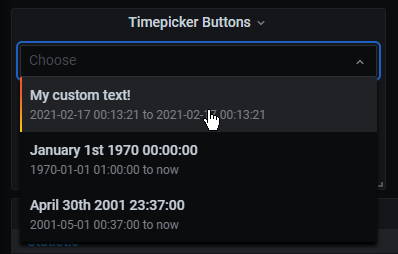
A Grafana panel which allows you to create a list of buttons which set specific times (retrieved from a datasource) on the dashboard's timepicker when clicked.
---
## Compatibility
This plugin works with Grafana 7.0.0 and up.
For older versions, check out the [releases](https://github.com/WilliamVenner/grafana-timepicker-buttons/releases) page.
---
## Installation
```bash
sudo service grafana-server stop
cd /var/lib/grafana/plugins
sudo git clone https://github.com/WilliamVenner/grafana-timepicker-buttons
sudo mv grafana-timepicker-buttons williamvenner-timepickerbuttons-panel
sudo chown grafana:grafana williamvenner-timepickerbuttons-panel -R
sudo chmod 774 williamvenner-timepickerbuttons-panel -R
sudo service grafana-server start
```
---
## Usage
### Display Style Configuration
The timepicker can be configured to display buttons (vertically or horizontally), or as a dropdown list.
 
### Field Mapping
All dates and times should use UTC.
**The data returned from the datasource must be formatted as a _Table_**, not a _Time Series_.
The panel can be configured to indicate which fields are mapped to the button properties:

The data fields returned from the datasource should be mapped with the following panel configuration settings:
| Column | Default Value | Description |
| --------------------- | ------------- | -------------------------------------------------------------------------------------------------------------------------------------------------------------------------------------------------------------------------------- |
| **Time From Field** | time_from | **Required**
A UNIX Timestamp (`Number`)
This will set the "From" part of the time range.
The value can include or exclude ms. Example: 1612413008000 or 1612413008 |
| **Time To Field** | time_to | _Optional_
A UNIX Timestamp (`Number`)
This will set the "To" part of the time range.
The value can include or exclude ms. Example: 1612413008000 or 1612413008
_If this is not supplied, it will default to `now`._ |
| **Button Text Field** | button_text | _Optional_
What the text inside the button will say.
_If this is not supplied, it will default to a locale-formatted timestamp._ |
| **Primary Field** | primary | _Optional_
Field used to determine if the button will be marked with a `star` icon |
| **Primary Value** | 1 | _Optional_
A Regex pattern to perform on the `Primary Field`. If matched the button will be marked with a `star` icon. |

---
**Credit**
Logo made by [DinosoftLabs](https://flaticon.com/authors/dinosoftlabs) on [www.flaticon.com](https://flaticon.com/)