
GitHub Actions Runners & Org Health
Dashboard for drumandbytes/github-actions-runner-exporter: runner online/busy state, CI health per workflow, job run/queue time history, open PRs, Dependabot alerts and API rate limit.
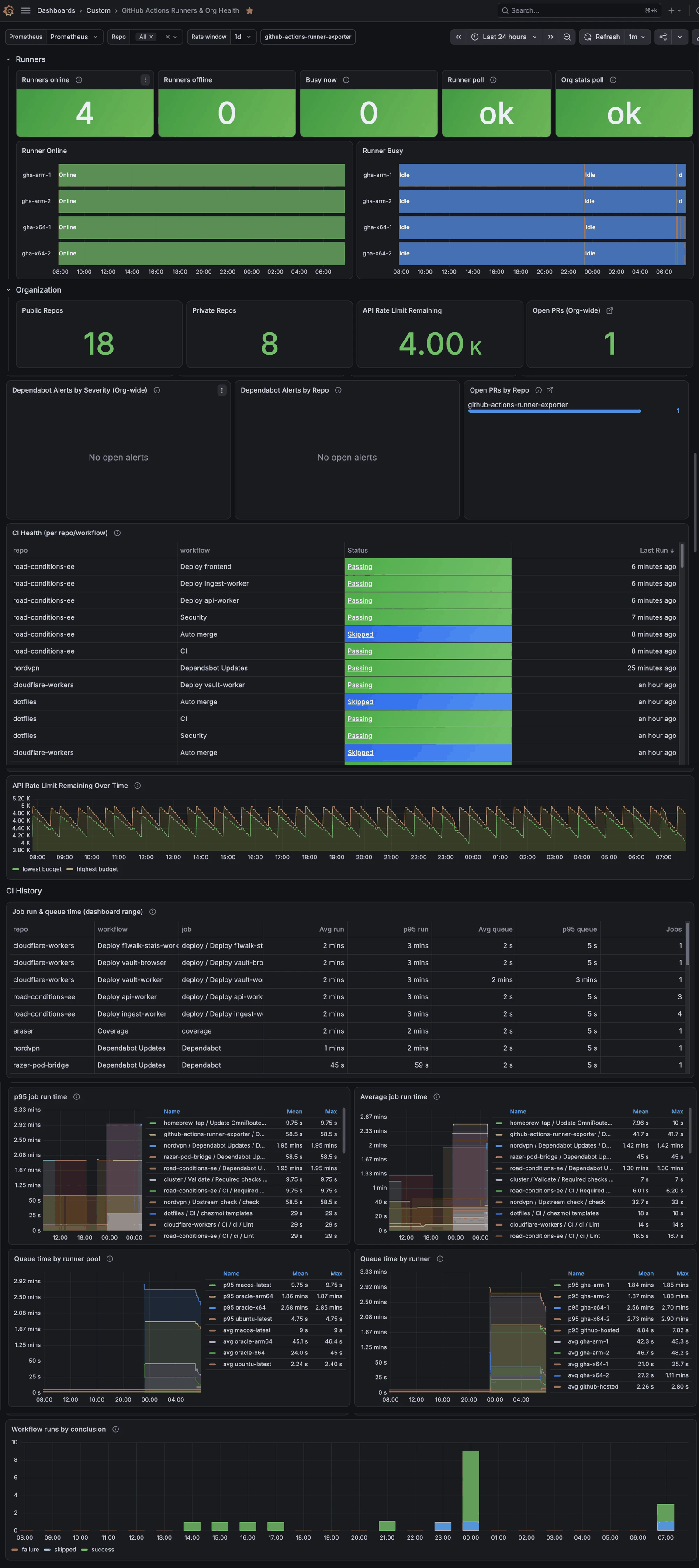
Monitor your organization's self-hosted GitHub Actions runners and overall repo health in one place. Built for github-actions-runner-exporter, a small open-source Go exporter (MIT).
What it shows
Runners
- Runners online, offline, and busy right now
- Per-runner online and busy timelines, so you can see capacity and queueing over the day
- Exporter health: whether the runner and org-stats polls are fresh or serving a stale cache
Organization
- Public and private repository counts
- GitHub API rate limit remaining, now and over time (lowest active budget window)
- Open pull requests, org-wide and per repository, with a click-through to the PRs on GitHub
- Dependabot alerts by severity, org-wide and per repository, with a click-through to each repo's alerts
- CI health table: the latest run of every active workflow per repo, with its conclusion and a link to the run
CI History
- Job run and queue time table for the selected time range, per repo, workflow and job
- Average and p95 job run time per job
- Queue time (average and p95) by runner pool, i.e. per runs-on label, for example x64 vs arm64
- Queue time by individual runner, with GitHub-hosted runners grouped together
- Completed workflow runs by conclusion (success, failure, cancelled and so on) over time
Variables
- Prometheus data source: select your instance on import; nothing is hardcoded to a specific one
- GitHub org and Repo: filter the panels
- Rate window: the rate window (6h, 1d or 7d) used by the CI History panels
Requirements
- Prometheus
- github-actions-runner-exporter, with a GitHub token that can read your organization's self-hosted runners, plus repository read access to Pull requests, Actions and Dependabot alerts for the Organization and CI History panels (see the exporter's README for details)
Getting started
Run the exporter
docker run -d -p 9222:9222 \
  -e GITHUB_ORG=your-org \
  -e GITHUB_TOKEN=your-token \
  ghcr.io/drumandbytes/github-actions-runner-exporter:latest
On Unraid, it's also in Community Apps (search for github-actions-runner-exporter).
Scrape it from Prometheus
scrape_configs:
  - job_name: github-actions-runner-exporter
    static_configs:
      - targets: ['exporter-host:9222']
Import this dashboard and select your Prometheus data source.
Notes
- Runner status is polled on a short cache (15s by default). Org and repo stats use a longer one (5 min) to stay well within GitHub's API rate limit.
- CI status is tracked per workflow, so a failing workflow can't hide behind a later, unrelated green run.
- Job queue and run times are recorded by the exporter as Prometheus histograms, so the CI History panels build up over time. Prometheus is the only store, so how far back they go depends on your retention. After the exporter starts, history fills in from that moment; earlier runs aren't backfilled.
Source, issues and the dashboard JSON: https://github.com/drumandbytes/github-actions-runner-exporter
Data source config
Collector config:
Upload an updated version of an exported dashboard.json file from Grafana
| Revision | Description | Created | |
|---|---|---|---|
| Download |

GitHub

Easily monitor GitHub, a service for software development and version control using Git, with Grafana Cloud's out-of-the-box monitoring solution.
Learn more