
Git AI — Code Attribution
Line-level AI attribution from git-ai, over a rolling 30-day window of locally committed code. At low coverage this is an adoption and data-quality view: read every percentage next to the sample size beside it.
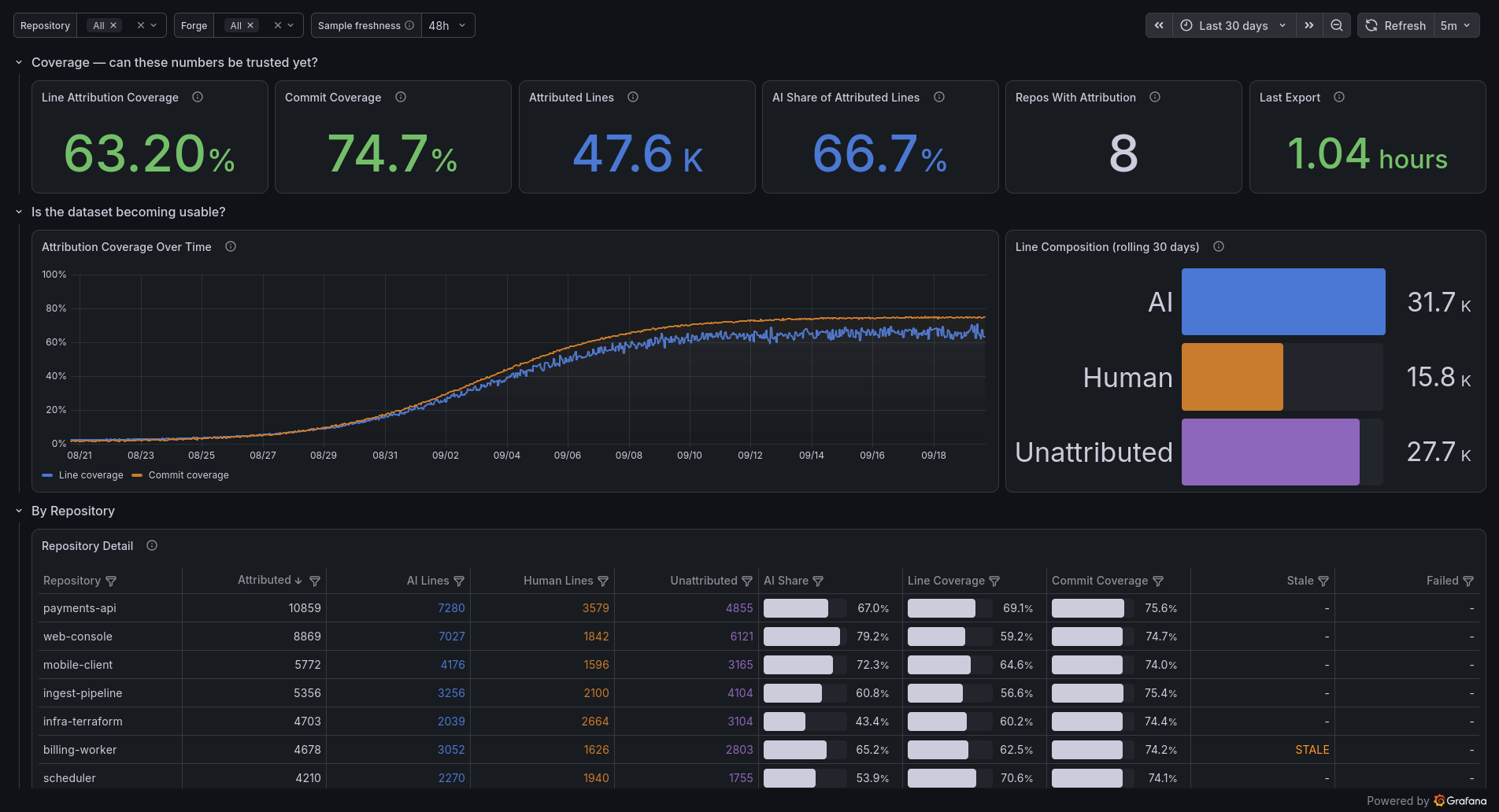
Tracks how much of the code you commit was written by an AI agent, and how much of it can be measured at all.
The data comes from git-ai, a git extension that
records which lines of each commit an agent wrote and stores it in git notes under
refs/notes/ai. The agents report their own lines, so nothing here is a classifier guessing
after the fact.
This measures what reached a commit, not what it cost to get there. Tokens and spend are covered well enough elsewhere, including by the AI CLI Tools dashboard this sits beside. The output side had nothing: lines of code, by author, that survived into the history.
Read coverage before you read anything else
git-ai can only attribute commits made after it was installed, so on a real repository almost every line starts out unattributable. A straight "% AI written" would read near zero for weeks and tell you nothing.
So the dashboard leads with coverage, meaning the share of lines and commits that carry any attribution at all, and every percentage sits next to the sample size behind it. Until coverage is worth something, read this as an adoption dashboard and not a productivity one. The repository table sorts on attributed lines, not on AI share, for the same reason. A repo with three attributed lines shouldn't look authoritative.
Panels
The top row is coverage: line and commit coverage, the attributed-line count, AI share of attributed lines, repos reporting, and how long ago the exporter last ran.
Below it, coverage over time, which is the panel that answers whether any of this is becoming worth reading. Beside that, the absolute split of AI, human and unattributed lines.
One row per repository follows, carrying its attributed lines, AI share, both coverage figures, and whether the numbers are stale or missing entirely.
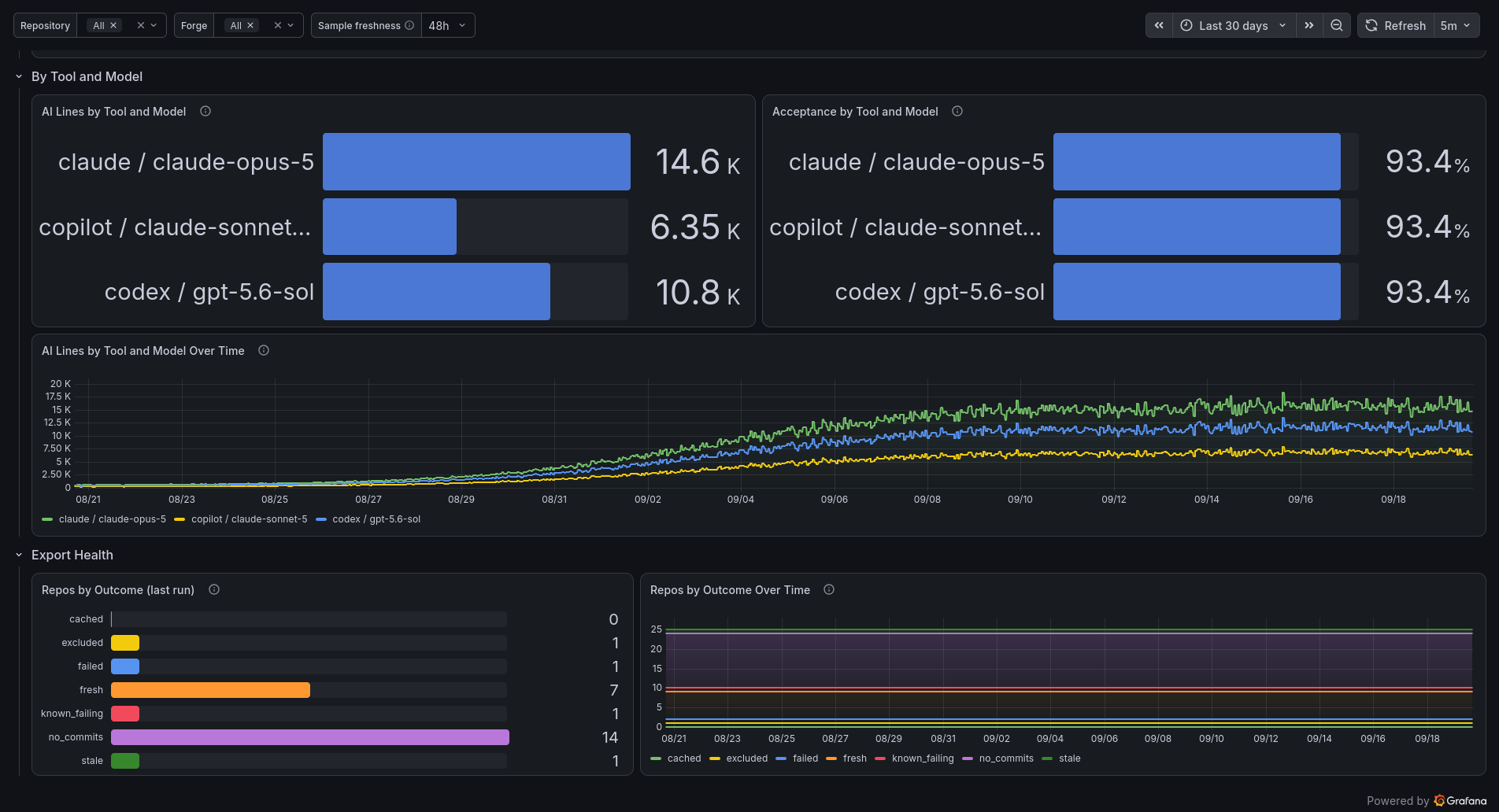
Tool and model pairs stay distinct. Collapsing them on the model name merges Copilot serving Sonnet with Claude Code serving Sonnet, and their acceptance rates aren't the same.
Last comes export health: every repo by outcome, fresh, cached, stale, failed, excluded or no commits in the window, with a run timestamp. Without it, a repo that vanishes from a chart and a repo the exporter couldn't read look identical.
What you need
A Prometheus-compatible data source. It was built against VictoriaMetrics, and nothing in it is VictoriaMetrics-specific.
The metrics come from the git-ai-exporter in
ai-cli-observability. It walks your
local repositories on a timer, runs git ai stats --json over a 30-day commit range on each
one, and pushes the results as OTLP gauges. Stdlib Python, no dependencies, and it caches per
repository because a 30-day walk over a large history takes minutes.
It emits gitai_ai_additions, gitai_ai_accepted, gitai_human_additions,
gitai_unknown_additions, gitai_diff_added_lines, gitai_diff_deleted_lines,
gitai_commits_total, gitai_commits_with_authorship, gitai_tool_ai_additions,
gitai_tool_ai_accepted, gitai_stats_stale, gitai_repo_failed, gitai_export_repos and
gitai_export_timestamp_seconds.
Sample freshness is not the time range
Repository and Forge filter the view. Sample freshness decides how far back to look for
the most recent export, and it isn't the measurement period. The exporter always reports a
rolling 30-day window whatever you set here. Leave it at 6h for an hourly exporter and raise it
if you export less often, otherwise the tiles go empty between runs.
That variable exists because these are gauges pushed on a schedule. Every query wraps
last_over_time(), since a plain instant query only looks back five minutes and would read
"No data" for most of each hour.
Things that will bite you
These numbers describe code committed locally, not code that shipped. The exporter reads each repository's HEAD on the machine it runs on. It knows nothing about merges, pull requests or deployments.
Only commits made on a machine running git-ai are attributed, so on a shared repository the AI share reflects your share of the commits, not the project's.
GitHub squash-merge rewrites commits on the server and drops the notes with them. Running
git ai ci github install preserves them. Without it, treat post-merge numbers on shared repos
as a floor.
Range mode reports the net diff across the window, not summed per-commit churn, so a line added and then rewritten counts once. That answers how much code there is. It won't tell you how much typing happened.
Data source config
Collector config:
Upload an updated version of an exported dashboard.json file from Grafana
| Revision | Description | Created | |
|---|---|---|---|
| Download |