
Go Goroutines
Go Goroutines is a Grafana dashboard for Go services on Kubernetes, with Prometheus as the datasource. It helps you find goroutine leaks, scheduler delays, and thread problems. It shows goroutine count per pod, a growth-rate panel for leak detection, comparison with 1 hour ago, top 5 pods, OS threads vs GOMAXPROCS, scheduler latency (p50/p90/p99), CPU usage, and goroutine stack memory. Requirements: Grafana 10+, a Prometheus data source, and the default client_golang Go metrics with the labels kubernetes_namespace and kubernetes_pod_name. The scheduler latency panel also needs the /sched/ runtime metrics turned on.
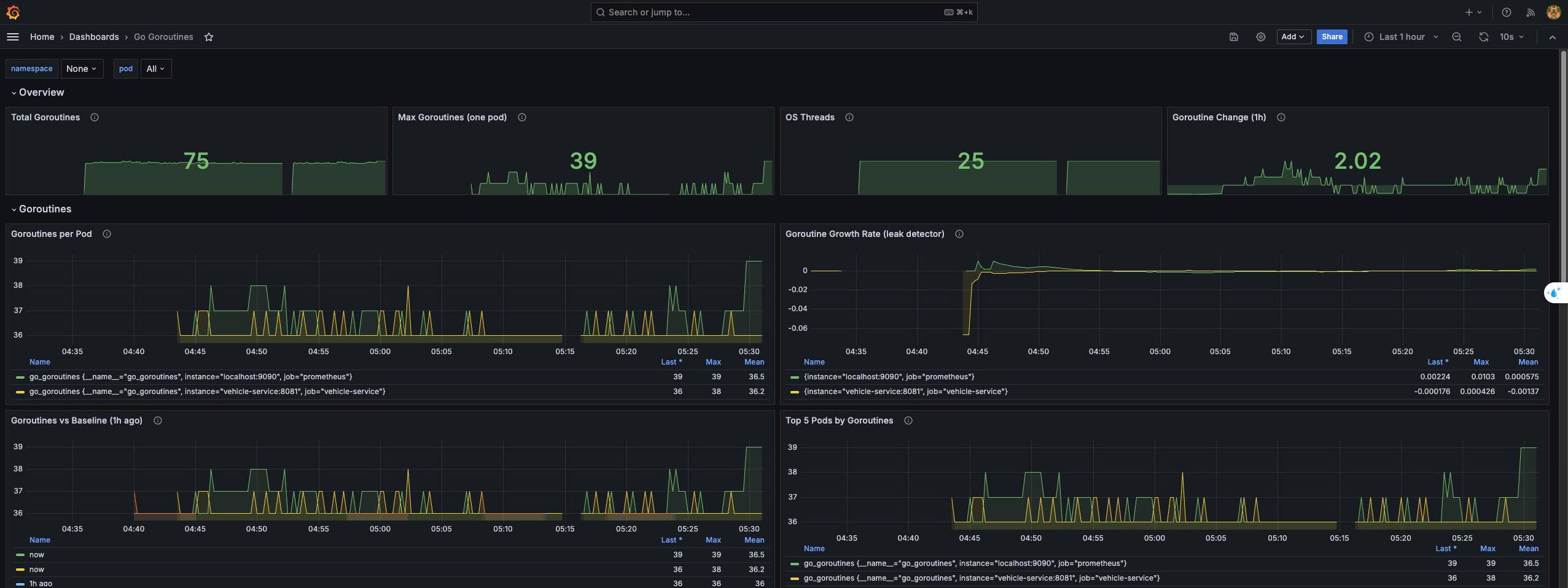
This dashboard helps you answer one main question: are my goroutines healthy, or are they leaking or waiting too long? It has four sections. Here is what each panel shows and how to read it.
1. Overview
These four boxes at the top give you a quick status check.
Total Goroutines adds up the goroutines in all the pods you selected. Max Goroutines (one pod) shows the biggest number in a single pod. This helps you find one bad pod, even if the total looks normal. OS Threads shows how many real operating system threads the Go runtime has created. Goroutine Change (1h) shows how many goroutines were added or removed compared to one hour ago. A number near 0 is normal. A big positive number means goroutines are piling up.
The colors change from green to orange to red when the numbers pass the thresholds I set. You should change these thresholds to match what is normal for your service.
2. Goroutines
This is the most important section.
Goroutines per Pod is a simple line for each pod over time. In a healthy service, the line goes up when traffic goes up and comes back down when traffic goes down. It looks like waves.
Goroutine Growth Rate (leak detector) shows the slope of the goroutine count over the last 15 minutes. A value of 0 means the count is stable. A value of 2 means about 2 new goroutines per second are staying alive. Short spikes are normal. But if the line stays above 0 for a long time, some goroutines start and never finish. This is a goroutine leak.
Goroutines vs Baseline (1h ago) draws two lines for each pod: the count now, and the count one hour ago. If traffic is the same but the "now" line is always higher, that is another sign of a leak.
Top 5 Pods by Goroutines shows the five busiest pods in the namespace. It ignores your pod filter, so you can always see which pods are the worst.
3. Scheduler & Threads
This section shows how well the Go scheduler runs your goroutines.
OS Threads vs GOMAXPROCS compares two numbers. GOMAXPROCS is how many threads can run Go code at the same time, usually equal to your CPU limit. OS threads can be higher, because a thread that is blocked in a system call or cgo call cannot run Go code, so the runtime creates a new one. A few extra threads is normal. If threads keep growing, your code probably has many blocking calls, like slow file I/O or cgo.
Goroutines per Thread / per CPU divides goroutines by threads and by GOMAXPROCS. It shows how much work each CPU has to share. There is no perfect number, but you can use it to compare pods or compare before and after a deploy.
Scheduler Latency shows how long a goroutine waits in the queue after it is ready to run and before it actually runs. It has p50, p90, and p99 lines. Low values, in microseconds, are good. High values, in milliseconds, mean the CPU is too busy or GOMAXPROCS is too low. This panel only works if you turned on the /sched/ runtime metrics, as I explained before.
CPU Usage shows how much CPU each pod uses. 100% means one full CPU core, and 200% means two cores. Look at it together with scheduler latency. If CPU is near your limit and latency goes up, the pod needs more CPU.
4. Goroutine Stacks
Every goroutine has its own stack memory. It starts small, around 2 KB, and grows when the function calls go deeper.
Stack Memory shows the stack memory in use and the total memory the runtime reserved for stacks. More goroutines means more stack memory, so this line usually moves with the goroutine count.
Average Stack Size per Goroutine divides stack memory by the number of goroutines. If this number grows, your goroutines have deep call chains (for example, deep recursion) or big local variables.
How to use it together
Here is an example. You see Goroutines per Pod slowly going up all day on one pod, and the Growth Rate stays above 0. CPU Usage and traffic are flat. This almost always means a leak, for example a goroutine waiting forever on a channel, or an HTTP call with no timeout. The next step is to get a goroutine dump from that pod with pprof (/debug/pprof/goroutine?debug=1) and look for the function that appears thousands of times.
If goroutines are normal but Scheduler Latency and CPU Usage are high, the problem is not a leak. The pod just does not have enough CPU for its work.
Data source config
Collector config:
Upload an updated version of an exported dashboard.json file from Grafana
| Revision | Description | Created | |
|---|---|---|---|
| Download |