
JVM & Virtual Threads - Micrometer OTLP / Alloy
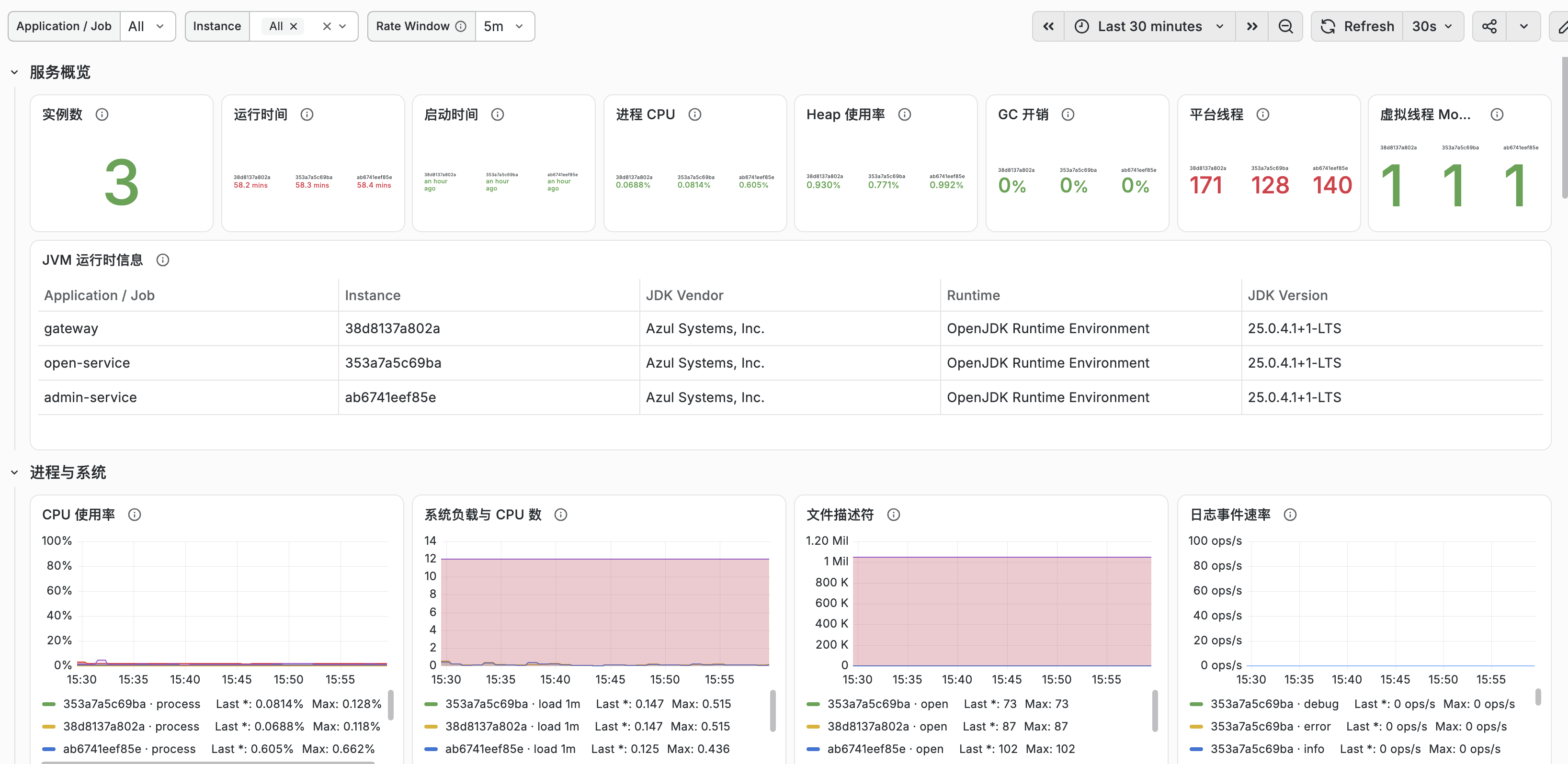
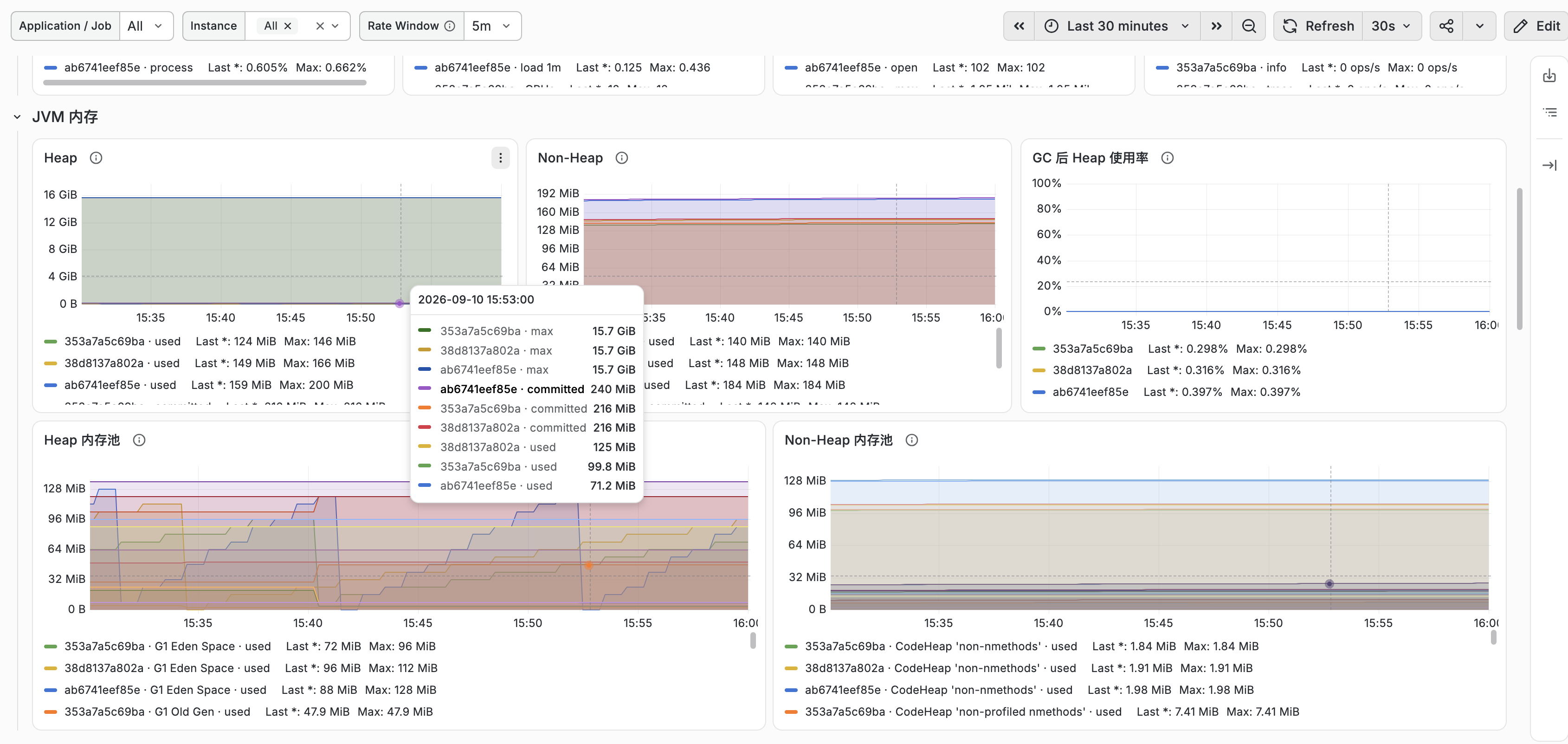
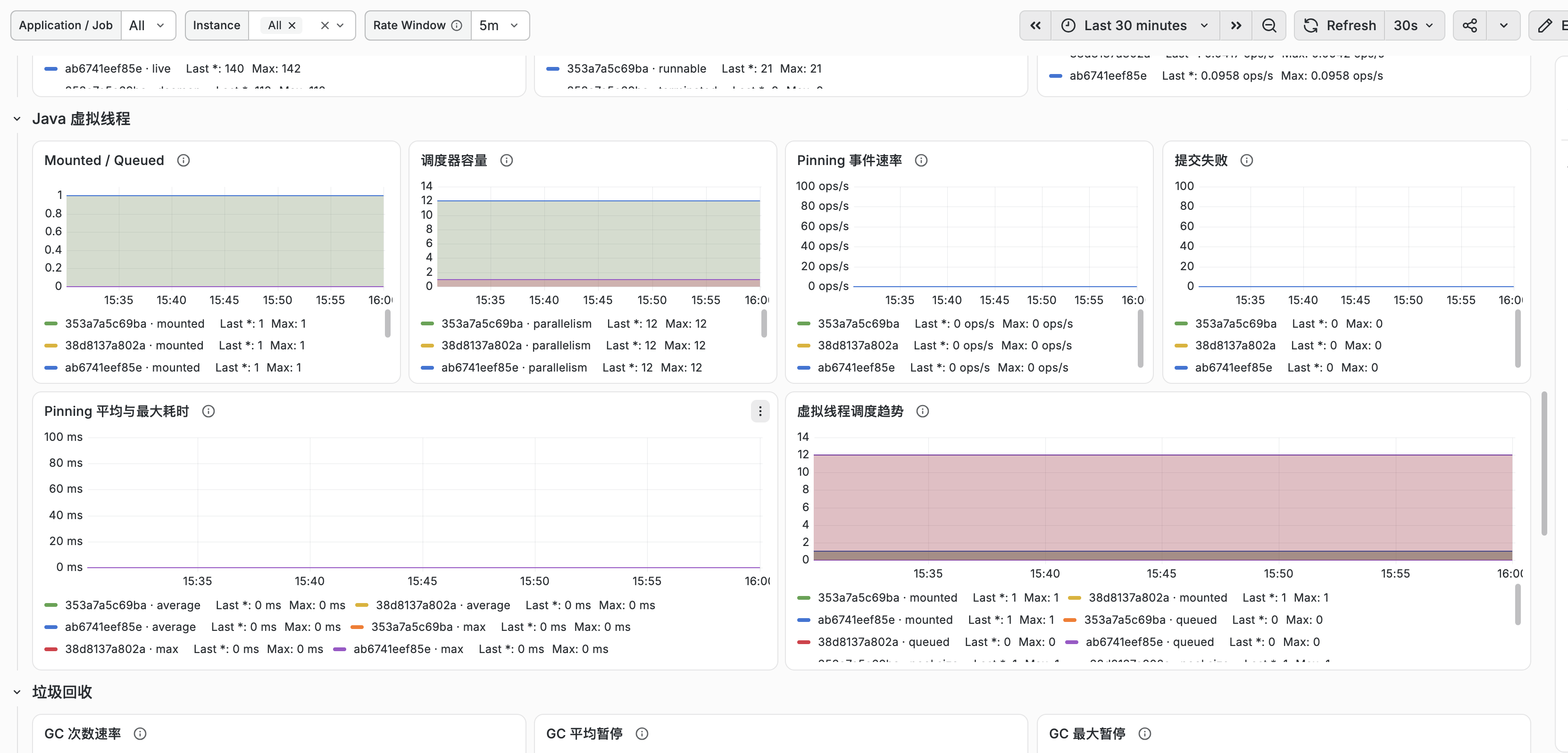
Monitor JVM and Java virtual-thread metrics for Spring Boot 3.2+ applications. Uses Micrometer OTLP metrics converted to Prometheus by Grafana Alloy. Filters metrics by Job, Hostname, and Instance; the Prometheus series must include the host_name label. Includes JVM runtime, CPU, memory, platform and virtual threads, GC, class loading, JIT, buffer pools, file descriptors, disk, and Logback events. Java 21+ is required for virtual threads; scheduler metrics require Java 24+. 面向 Spring Boot 3.2+ 应用的 JVM 与 Java 虚拟线程监控面板。使用 Micrometer OTLP 上报并由 Grafana Alloy 转换为 Prometheus 指标,按 Job、Hostname 和 Instance 联动筛选,Prometheus 时序必须包含 host_name 标签。涵盖 JVM 运行时、CPU、内存、平台线程与虚拟线程、GC、类加载、JIT、Buffer Pool、文件描述符、磁盘和 Logback 日志事件。虚拟线程需要 Java 21+,完整调度器指标需要 Java 24+。
JVM & Virtual Threads - Micrometer OTLP / Alloy
A Grafana dashboard for Spring Boot JVM applications, including Java virtual-thread metrics exported through Micrometer OTLP and converted to Prometheus metrics by Grafana Alloy.
Features
- JVM vendor, runtime and exact version for each service instance
- JVM heap, non-heap and memory pools
- Process and system CPU usage
- Platform thread count and states
- Virtual-thread pinning events, duration and submission failures
- Mounted and queued virtual threads
- Virtual-thread scheduler parallelism and pool size
- Garbage collection rate, pause duration and allocation
- Class loading and JIT compilation
- Buffer pools, file descriptors, disk usage and Logback events
Requirements
- Grafana 11 or later
- Prometheus data source
- Spring Boot 3.2 or later with Actuator and Micrometer
- Java 21 or later for virtual threads
- Micrometer 1.14 or later and
io.micrometer:micrometer-java21for virtual-thread event metrics - Java 24 or later for
jvm.threads.virtual.parallelism,jvm.threads.virtual.pool.sizeandjvm.threads.virtual.live - Grafana Alloy with
otelcol.exporter.prometheus - Alloy
add_metric_suffixes = true(the default) - OpenTelemetry resource attributes
service.nameandservice.instance.id - The GC pause P95/P99 panel requires percentile histograms for
jvm.gc.pause; the configuration is shown below
Tested with Spring Boot 4.1, Micrometer 1.17, JDK 25, Grafana Alloy 1.19 and Prometheus 3.14.
Spring Boot compatibility
| Spring Boot | Base JVM panels | Virtual-thread metrics | Setup |
|---|---|---|---|
| 4.x | Supported | Supported | Add micrometer-java21; Spring Boot auto-configures the binder |
| 3.4 / 3.5 | Supported | Supported | Add micrometer-java21 and register VirtualThreadMetrics as a Spring bean |
| 3.2 / 3.3 | Supported | Limited | Base JVM panels work; use a compatible Micrometer 1.14+ setup and register the binder manually |
| Earlier versions | Not tested | Not tested | Metric names and OTLP resource handling can differ |
For Spring Boot 3.4 and 3.5, register the binder explicitly:
import io.micrometer.java21.instrument.binder.jdk.VirtualThreadMetrics;
import org.springframework.context.annotation.Bean;
import org.springframework.context.annotation.Configuration;
@Configuration(proxyBeanMethods = false)
class VirtualThreadMetricsConfiguration {
@Bean
VirtualThreadMetrics virtualThreadMetrics() {
    return new VirtualThreadMetrics();
}
}
Java 21 provides pinning-duration and submission-failure events. The scheduler gauges for parallelism, pool size, mounted threads and queued threads require Java 24 or later.
Data flow
Spring Boot -> Micrometer OTLP -> Grafana Alloy -> Prometheus -> Grafana
Grafana Alloy maps OpenTelemetry resource attributes to Prometheus target labels:
service.name        -> job
service.instance.id -> instance
Maven dependency
Add the Maven dependency io.micrometer:micrometer-java21. Let a compatible Spring Boot dependency management configuration supply its version.
Spring Boot configuration
management:
  metrics:
    distribution:
      percentiles-histogram:
        "[jvm.gc.pause]": true
      minimum-expected-value:
        "[jvm.gc.pause]": 1ms
      maximum-expected-value:
        "[jvm.gc.pause]": 10s
  opentelemetry:
    resource-attributes:
      "[service.name]": ${spring.application.name:application}
      "[service.instance.id]": "${HOSTNAME:${random.uuid}}"
      "[deployment.environment.name]": ${DEPLOYMENT_ENV:unknown}
  otlp:
    metrics:
      export:
        url: ${OTEL_EXPORTER_OTLP_METRICS_ENDPOINT}
Example endpoint:
OTEL_EXPORTER_OTLP_METRICS_ENDPOINT=http://alloy:4318/v1/metrics
Grafana Alloy configuration
otelcol.receiver.otlp "default" {
  grpc {
    endpoint = "0.0.0.0:4317"
  }
http {
endpoint = "0.0.0.0:4318"
}
output {
metrics = [otelcol.exporter.prometheus.default.input]
}
}
otelcol.exporter.prometheus "default" {
forward_to = [prometheus.remote_write.default.receiver]
}
prometheus.remote_write "default" {
endpoint {
url = "http://prometheus:9090/api/v1/write"
}
}
Import
- Open Dashboards -> New -> Import in Grafana.
- Enter this dashboard ID or upload the downloaded JSON file.
- Select the Prometheus data source.
- Select the application and instance using the
jobandinstancevariables.
Compatibility notes
This dashboard targets Micrometer OTLP metrics converted by Grafana Alloy. Directly scraping /actuator/prometheus can produce different metric unit suffixes and is not covered by this edition.
Some panels are conditional:
- Scheduler panels require Java 24 or later.
- Log event panels require Logback.
- File descriptor metrics depend on operating-system support.
- The GC pause percentile panel requires the
jvm.gc.pausepercentile histogram configuration shown above. Other GC panels work without it.
Empty rate panels with OTLP
Spring Boot exports OTLP metrics every minute by default. This dashboard therefore uses a configurable Rate Window with a default of 5m instead of Grafana's scrape-based $__rate_interval. Increase the window when your OTLP export step is longer than one minute.
Rate Window is only the PromQL lookback interval used by rate() and histogram_quantile(). It does not change the OTLP export step, Grafana refresh interval, or dashboard time range. A longer window is smoother and less likely to contain too few samples; a shorter window reacts faster to recent changes.
It affects these panels:
- Log event rate
- Platform thread start rate
- Virtual-thread pinning event rate and average duration
- GC collection rate, average pause, and pause percentiles
- Memory allocation and promotion
- Class load and unload rates
- JIT compilation time rate
The Logback rate panel displays zero when logback_events_total exists but no new log events occur in the selected window. It remains empty when the application does not use Logback or the Logback metrics binder is disabled.
JVM 与虚拟线程监控
监控 Spring Boot 应用的 JVM 和 Java 虚拟线程。Micrometer 通过 OTLP 上报指标,Grafana Alloy 将其转换后写入 Prometheus。
包含 JDK 版本、CPU、内存、平台线程、虚拟线程、Pinning、GC、类加载、JIT、Buffer Pool、文件描述符、磁盘和 Logback 日志事件。
要求
- Grafana 11+ 与 Prometheus 数据源
- Spring Boot 3.2+ 与 Actuator
- Java 21+ 和 Micrometer 1.14+:虚拟线程事件指标
- Java 24+:虚拟线程调度器指标
- Grafana Alloy
otelcol.exporter.prometheus
Spring Boot 4.x 会自动配置虚拟线程指标;Spring Boot 3.4/3.5 需要自行注册 VirtualThreadMetrics。已验证 Spring Boot 4.1、Micrometer 1.17、JDK 25、Alloy 1.19 和 Prometheus 3.14。
应用配置
添加 Maven 依赖:io.micrometer:micrometer-java21,版本由兼容的 Spring Boot 依赖管理统一提供。
management:
  metrics:
    distribution:
      percentiles-histogram:
        "[jvm.gc.pause]": true
      minimum-expected-value:
        "[jvm.gc.pause]": 1ms
      maximum-expected-value:
        "[jvm.gc.pause]": 10s
  opentelemetry:
    resource-attributes:
      "[service.name]": ${spring.application.name:application}
      "[service.instance.id]": "${HOSTNAME:${random.uuid}}"
  otlp:
    metrics:
      export:
        url: ${OTEL_EXPORTER_OTLP_METRICS_ENDPOINT}
Spring Boot -> Micrometer OTLP -> Grafana Alloy -> Prometheus -> Grafana
service.name -> job
service.instance.id -> instance
jvm.gc.pause Histogram 用于计算 GC P95/P99。不配置时仅“GC 暂停分位数”为空,其他 GC 面板仍可使用。
使用
- 在 Dashboards -> New -> Import 上传 JSON。
- 选择 Prometheus 数据源。
- 使用
Application / Job和Instance筛选实例。
Rate Window 是速率和分位数查询的回看窗口,不会改变 OTLP 上报或 Grafana 刷新周期。默认 5m 适配 Spring Boot 默认 1m OTLP 上报。它影响日志、线程启动、Pinning、GC、内存分配、类加载和 JIT 速率面板。
Logback、文件描述符和部分虚拟线程面板依赖应用、操作系统及 Java 版本,缺少对应指标时允许为空。
本 Dashboard 适配 Micrometer OTLP 经 Alloy 转换后的指标;直接抓取 /actuator/prometheus 可能产生不同的指标后缀。
Data source config
Collector config:
Upload an updated version of an exported dashboard.json file from Grafana
| Revision | Description | Created | |
|---|---|---|---|
| Download |

Grafana Alloy

Easily monitor the health of Grafana Alloy, an open source distribution of the OpenTelemetry Collector, with Grafana Cloud's out-of-the-box monitoring solution.
Learn more