

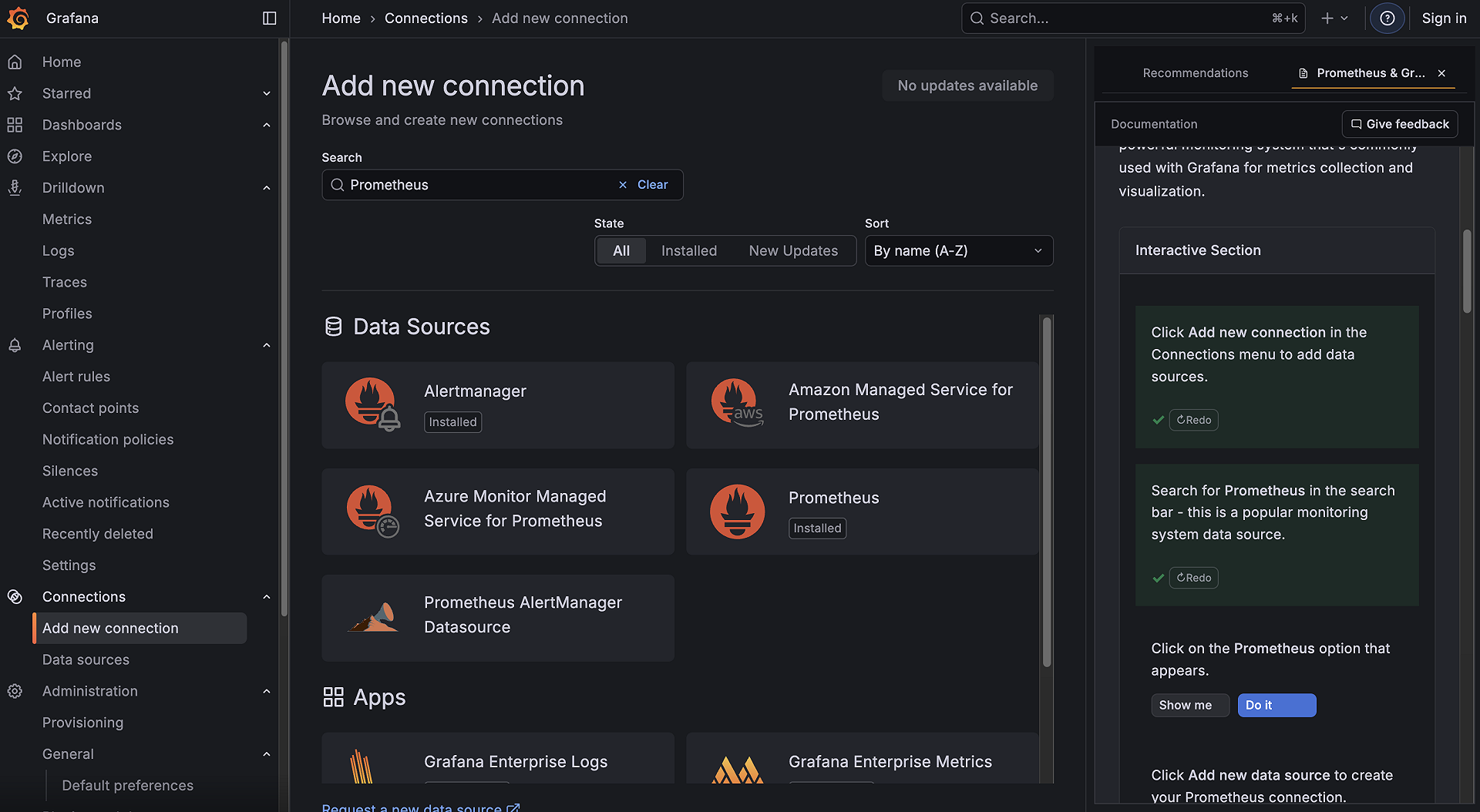
Interactive learning
Learn Grafana while you work
Interactive learning, also called Pathfinder, brings documentation and guided practice into Grafana. Use it to understand an unfamiliar feature, follow an onboarding path, or work through a guide your team has published.
- Context-aware recommendations: Find documentation and guides relevant to the Grafana page you are using.
- Interactive guides: Use Show me to find a control and Do it to perform the described action with your Grafana permissions.
- Learning paths: Follow milestones, choose a track where available, and review progress in My learning.
- Custom guides: Users with the Editor or Admin role can create content with the block editor. Saving and publishing requires storage support on the instance.
- Flexible layouts: Keep guides in sidebar tabs, move them to a floating panel, or use full screen.
Availability and administration
Interactive learning is in public preview for Grafana Cloud and self-managed Grafana. Availability depends on the instance configuration and Cloud rollout. The current plugin requires Grafana 12.3 or later.
On a Cloud stack where it is available, select Help to open Interactive learning. For self-managed installation and your first guide, refer to Get started.
Administrators can disable Pathfinder in Grafana Cloud to restore the classic Help menu after users reload, while keeping learning progress. You can also turn off context-aware recommendations while keeping guides available.
Explore next steps
Was this page helpful?
Related resources from Grafana Labs


