
Test resilience with k6 spike testing
Baseline tests simulate steady traffic, but production environments also see sudden surges from launches, campaigns, or redirected traffic. Spike testing ramps the load up sharply, holds it briefly, then drops it so you can see whether your system survives the burst and how quickly it recovers.
This path builds on Establish a performance baseline with k6. For the full k6 series sequence, complete Find your system’s limits with k6 before you start. You practice on QuickPizza; it may handle the spike without errors or higher latency, but the same steps (design the profile, read each phase in Grafana Cloud k6, record recovery time) apply to your own stack.
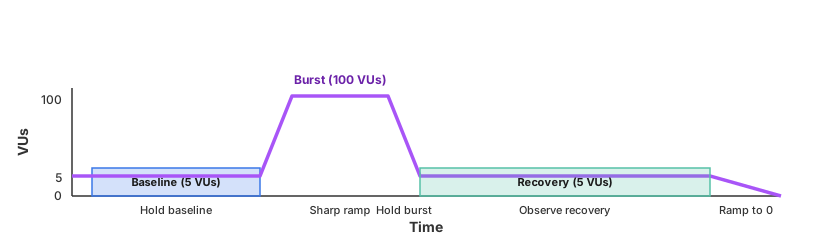
The diagram below shows the spike profile you build in this path: a baseline load, a sharp burst, a recovery window back at baseline, then a ramp down to zero. This is the standard spike testing shape, with the baseline and recovery phases called out so you can measure how long the system takes to return to normal after the burst.
Here’s what to expect
When you complete this path, you’ll be able to:
- Explain why spike-shaped load tests burst response and recovery in ways gradual ramps miss
- Design a spike profile with short ramps, a burst hold, a recovery window, and appropriate thresholds
- Run a multi-phase spike script locally and interpret what blended summaries do and do not show
- Read baseline, burst, and recovery phases in a Grafana Cloud k6 timeline
- Document per-phase metrics, a recovery-time estimate, and a recovery category your team can reuse
- Prioritize follow-up work from your recovery pattern, including SLO checks and retest timing
Optional sidebar milestones cover multi-endpoint spikes and authenticated APIs; skip them anytime for a shorter path.
Before you begin
Before you test resilience with spike testing, ensure that you have:
- A Grafana Cloud account. To create an account, refer to Grafana Cloud.
- k6 installed on your machine. To install k6, refer to Install k6.
- Basic knowledge of JavaScript (k6 scripts are written in JavaScript).
- A code editor such as Visual Studio Code or Cursor.
- Access to a terminal or command line interface.
Troubleshooting
If you get stuck, we’ve got your back! Where appropriate, troubleshooting information is just a click away.
More to explore
- Spike testing — test-type guide for when and how to run spike tests
- Stress testing — gradual ramp to peak load; complements baseline and spike testing
- Average-load testing — steady-state benchmarks this path builds on