
Open the Cost Management and Billing app
The Cost Management and Billing app is your central hub for understanding usage and costs across your Grafana Cloud organization. It replaces the older Billing/Usage dashboard and brings spend tracking, cost attribution, usage alerts, and invoices together in one place.
In this section, you’ll open the Cost Management and Billing app and locate the overview of your current spend. Sign in to your Grafana Cloud instance first, for example
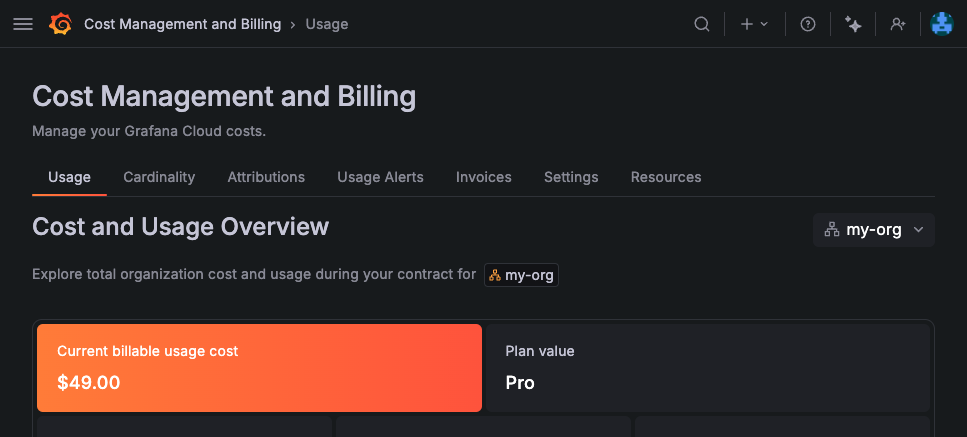
mystack.grafana.net.Open the Cost Management and Billing app. It opens on the Usage tab, which shows your current spend and usage.
The Usage tab is where you track current spend and per-product usage.
The Cost and Usage Overview summarizes billable usage cost, plan cost, and overages.
The Monthly Usage chart shows monthly cost and Adaptive Telemetry savings for the selected period.
You opened the app and located your spend overview on the Usage tab.
Find your way around
The app organizes billing and usage information into tabs:
- Usage: Your current billable usage cost, monthly usage, and per-product breakdown of usage and cost.
- Cardinality: Tools to analyze metrics cardinality, a common driver of metrics cost.
- Attributions: Usage and cost broken down by your configured cost attribution labels, so you can assign spend to teams or services.
- Usage Alerts: Create and manage alerts that notify you when usage or cost approaches a threshold.
- Invoices: View and download your monthly invoices.
The roles you have determine which tabs you can see. For example, viewing usage requires the Billing and usage reader role.
Read the Usage tab
Below the Cost and Usage Overview, the Product Breakdown section lists each billable product, such as Metrics, Logs, Traces, and k6, with its current usage and cost.
By default the Usage tab shows the current billing period. Use the controls at the top of the page to change the period when you want to compare months or align with your billing cycle.
In the next milestone, you’ll use the Product Breakdown to identify which products contribute most to your monthly costs.
More to explore (optional)
At this point in your journey, you can explore the following paths: