Load profile shape
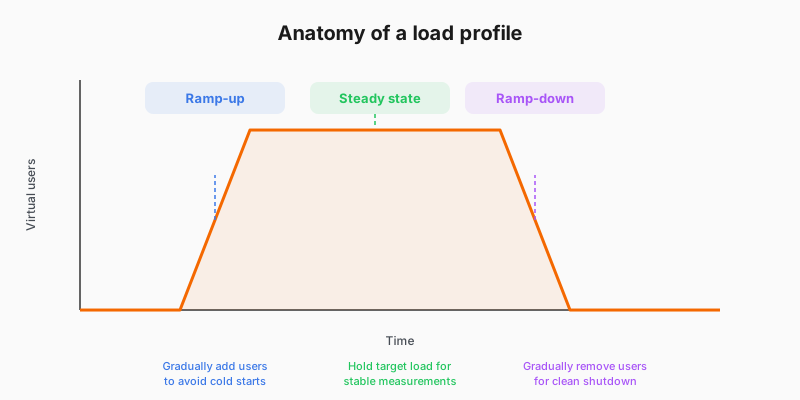
A baseline load profile has three phases.
Scenarios, executors, and stages
k6 uses scenarios to describe how a test runs. Each scenario picks an executor that schedules virtual users or iteration rate. The ramping-vus executor changes the target number of VUs over time using a stages array, which matches the ramp-up, steady-state, and ramp-down idea above.
Putting stages on the root options object is a shortcut for a single scenario that uses the ramping-vus executor. For several traffic shapes in one script, or when you want scenario names in results, configure the scenarios object explicitly instead.
Example: shortcut with stages
export const options = {
  stages: [
    { duration: '30s', target: 20 },  // ramp up
    { duration: '1m',  target: 20 },  // steady state
    { duration: '30s', target: 0 },   // ramp down
  ],
};
Example: explicit scenario with ramping-vus
export const options = {
  scenarios: {
    baseline: {
      executor: 'ramping-vus',
      stages: [
        { duration: '30s', target: 20 },
        { duration: '1m',  target: 20 },
        { duration: '30s', target: 0 },
      ],
    },
  },
};
Choosing your VU count
Match VUs to observed or expected concurrency for the traffic slice you are baselining, not an arbitrary round number. If you do not yet have production metrics, start from staging access logs or product assumptions, then adjust after you see stable http_req_duration and error rate in the steady-state window.
If your profile uses ramping-vus, the target in each stage is the number of VUs k6 tries to schedule; combined with iteration time, that determines how much load you actually generate. For a deliberately constant request rate instead, you would pick an arrival-rate executor; refer to API load testing: request rate. This journey stays on ramping VUs because it matches the baseline paths you run next.
A baseline measures normal behavior; deliberately exceeding your production concurrency belongs in stress or load-test scenarios covered in the k6 test types guide after you have a baseline.