
Correlation is powerful, but it isn’t automatic
A slow trace often raises a follow-up question: which metric alerted you to it, or what the logs for this exact request say. Jumping from one signal to another for the same request is called correlation, and it’s one of the most useful things you can do once you can read a trace.
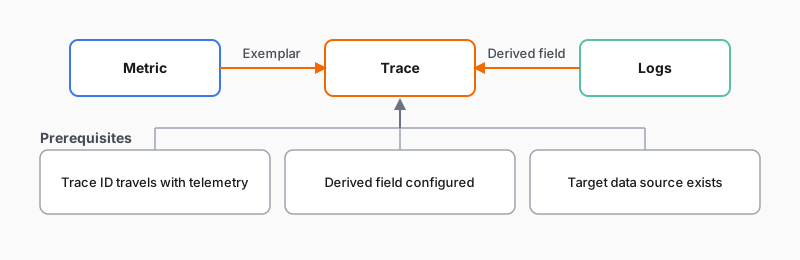
These links run in both directions, and each one is its own clickable jump. A metric chart can carry a link that takes you straight to a representative trace behind a spike; that link is called an exemplar. In the same way, a log line can carry a link to the trace for that exact request, so you can open a log and jump straight to the trace that produced it.
It needs prerequisites
Correlation works once it’s set up, but the jumps don’t happen on their own. The jump from a log to its trace, for example, needs a few pieces in place first:
- Trace IDs travel with your telemetry: your logs carry the trace ID of the request they belong to, so a log line can be tied back to its trace.
- A link is configured: a Grafana data source setting, called a derived field, turns that trace ID in the log into a clickable link to the trace.
- The target exists: the trace data source you’re linking to is connected in Grafana.
The diagram shows both jumps landing on the trace, with the log-to-trace jump resting on the three prerequisites above.
When a piece is missing, the jump quietly does nothing. So treat cross-signal correlation as a payoff you set up, not a switch that’s on by default. Wiring it up is part of the separate setup journey.