What is a span?
Each step in that checkout trace is a span: one unit of work, with an operation name that says what it did and a duration that says how long it took. The web service handling the request is a span. The call to the payments service is a span. A trace is made of one or more spans.
Spans nest into a tree
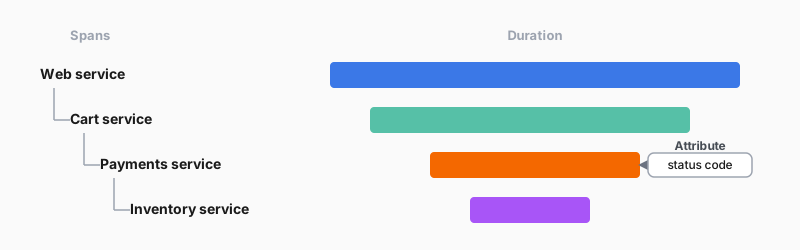
Spans aren’t a flat list. When one operation triggers another, the second span becomes a child of the first, so the spans form a tree:
- The web service span is the parent of the cart span.
- The cart span is the parent of the payments span, and the payments span is the parent of the inventory span.
Each call nests inside the one that triggered it. This parent/child nesting is what shows that the payments call happened inside the web service’s handling of the request, not beside it.
Attributes: the details on a span
Each span also carries attributes: key-value details about that step, for example the HTTP method or the status code returned. When you read a trace later, attributes are what tell you what each span actually did.
Read the checkout trace as a tree of spans: the web service, cart service, payments service, and inventory service, each nested inside the call that triggered it, with a duration bar and its attributes.