Configuration strategies
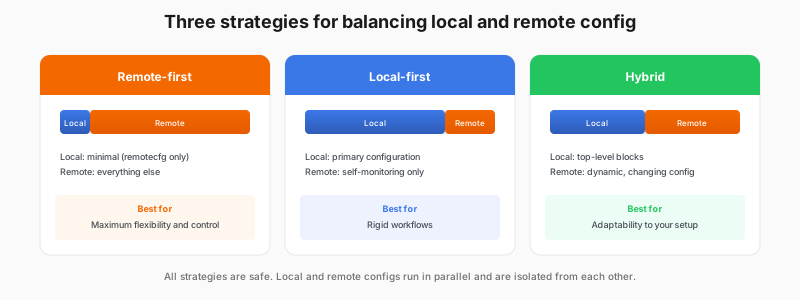
Fleet Management gives you flexibility in how you balance local and remote configuration. You don’t have to go all-in on either approach. Choose the strategy that fits your situation.
Remote-first
Minimal local config, everything else managed remotely. Best when a dedicated team manages observability and you want maximum central control over the fleet.
remotecfg {
    url = "https://..."
    // ... auth config
    id = constants.hostname
    attributes = {"env" = "prod"}
}

// Everything else comes from Fleet Management
Local-first
Primary config stays local, Fleet Management for self-monitoring. Best when your main configuration is already managed through an existing deployment process and you want Fleet Management mainly for collector health.
// Local config: full configuration
remotecfg {
    url = "https://..."
    id = constants.hostname
    attributes = {"env" = "prod"}
}

// All your standard collection is here
prometheus.scrape "node" { /* ... */ }
prometheus.scrape "app" { /* ... */ }
loki.source.file "logs" { /* ... */ }

// Fleet Management used only for collector self-monitoring
Hybrid
Top-level config blocks stay local. Everything else is remote. Best when some configuration must stay local but your needs vary by environment, so the rest is easier to manage remotely.
// Local config: top-level blocks
logging { level = "info" }

livedebugging { enabled = true }

remotecfg {
    url = "https://..."
    id = constants.hostname
    attributes = {"env" = "prod"}
}

// All other config managed remotely in Fleet Management