What are attributes?

An attribute is a key-value pair that describes a collector, like a label or tag. Fleet Management uses attributes to match configuration pipelines to collectors.
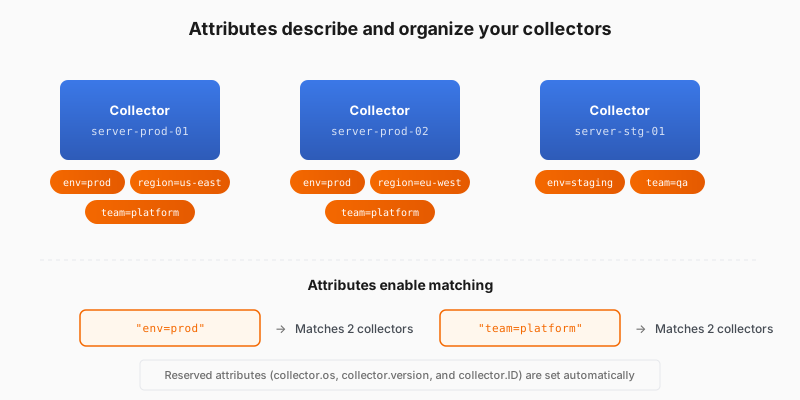
Attributes describe and organize your collectors

Why use attributes

When you have 50 collectors, you don’t want to manage them one by one. You want to say “apply this configuration to all production collectors” or “update all collectors in the us-east region.” Attributes make that possible. You match configuration pipelines to collectors based on their attributes.

The better you categorize your fleet with attributes, the more powerful remote configuration becomes:

  • Configure at scale by applying one pipeline to every collector that shares an attribute.
  • Organize your fleet by attributes like env, region, or team.

Three types of attributes

TypeDescriptionSet by
ReservedPreset attributes such as collector.os, collector.version, collector.IDFleet Management (auto)
LocalSet in the collector or Supervisor local config fileYou
RemoteSet in the Fleet Management user interface in Grafana CloudYou

OpenTelemetry collectors report additional reserved keys, such as service.name, os.type, host.*, and cloud.*.

Script

Let’s talk about attributes, one of the most important concepts in Fleet Management.

An attribute is a key-value pair that describes a collector. For example, env equals production, or region equals us-east. Think of attributes like labels or tags. They’re metadata that helps Fleet Management understand what each collector is and how it should be configured.

Here’s why attributes matter. When you have 50 collectors, you don’t want to manage them one by one. You want to say “apply this configuration to all production collectors” or “update all collectors in the us-east region.” Attributes make that possible. They’re the language you use to group and organize collectors.

What if you don’t create your own attributes? Technically, you can register a collector without any custom attributes. But then you lose the ability to add additional meaningful categories. You’d have to assign configurations based on reserved attributes only, which doesn’t take advantage of all Fleet Management can do. Attributes are what make “fleet” management easier.

There are three types. Reserved attributes are set automatically by Fleet Management, like the operating system and collector version. Local attributes are the ones you create in the remotecfg block in the collector’s local configuration. You create remote attributes in the Fleet Management interface in Grafana Cloud. Both local and remote attributes are custom labels you define, such as environment, region, team, or whatever makes sense for your organization.