Slide 8 of 10

GCP logs: Alloy + Pub/Sub

How it works

Complexity: Moderate | Infrastructure: Pub/Sub + Alloy | Latency: Streaming
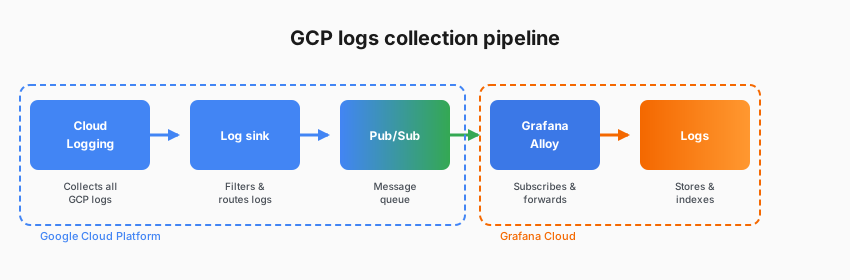
GCP logs collection pipeline

You create a log sink in Cloud Logging with filters that select which logs to export. The sink routes them to a Pub/Sub topic. Alloy subscribes to the topic, processes the logs, and forwards them to Grafana Cloud Logs. Sink filters let you reduce volume at the source.

Considerations

  • Reliable Pub/Sub message delivery
  • Log sink filtering to reduce volume
  • Workload identity authentication
  • Full processing pipeline
  • Alloy infrastructure to deploy, maintain, and update
  • Pub/Sub cost, plus setup steps

Documentation

View the GCP logs documentation.

Script

For GCP, log collection looks a bit different. There’s no serverless Lambda-equivalent approach here.

The standard architecture uses log sinks, Pub/Sub, and Alloy working together.

Here’s how it flows: you create a log sink in Cloud Logging with filters to select which logs you want. That sink routes logs to a Pub/Sub topic. Pub/Sub is Google’s managed messaging service.

Then Alloy subscribes to that Pub/Sub topic, receives the logs, processes them, and forwards them to Grafana Cloud Logs.

Why this architecture? Pub/Sub provides reliable, scalable message delivery. Log sink filters let you reduce volume at the source. You only have to export what you actually need.

And Alloy gives you the full processing pipeline for transformation and enrichment.

Yes, this involves more infrastructure to set up. But once you configure it, which you can template with Terraform, it scales beautifully.

This is how organizations successfully get GCP logs into Grafana Cloud.