Slide 6 of 10

Azure logs: Functions

How it works

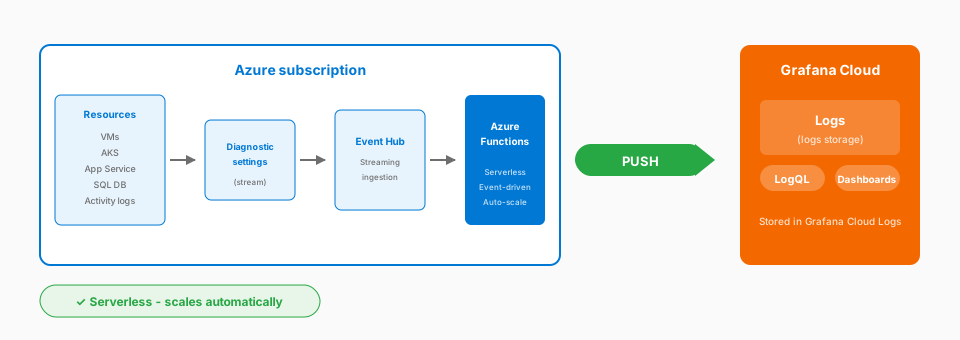
Azure logs Functions architecture: Diagnostic Settings to Event Hub to Azure Functions to Grafana Cloud Logs

Complexity: Simple | Infrastructure: Serverless | Latency: Event-driven

Configure diagnostic settings on your Azure resources to stream logs to an Event Hub. An Azure Function triggers when logs arrive and forwards them to Grafana Cloud Logs.

Considerations

  • Serverless and event-driven
  • Automatic scaling
  • Native Azure integration
  • Near real-time delivery
  • Basic log processing capability
  • Function execution and Event Hub costs
  • Subject to the Azure Functions timeout limit

When to use

  • Event-driven log collection
  • Serverless architecture
  • Azure-native teams

Documentation

View the Azure Functions logs documentation.

Script

Moving to Azure. The serverless approach here uses Azure Functions with Event Hub.

Here’s the flow: you configure diagnostic settings on your Azure resources to stream logs to an Event Hub. Then, an Azure Function triggers when logs arrive in that Event Hub and forwards them to Grafana Cloud Logs.

It’s serverless end-to-end. No VMs, no containers. Azure handles scaling, retries, everything.

The costs come from Event Hub throughput units and Function executions, so plan accordingly for high-volume scenarios.

Functions can transform logs with basic processing capability. If your team is already invested in Azure serverless, this approach fits naturally into your operational model.