Slide 4 of 10

AWS logs: Lambda

How it works

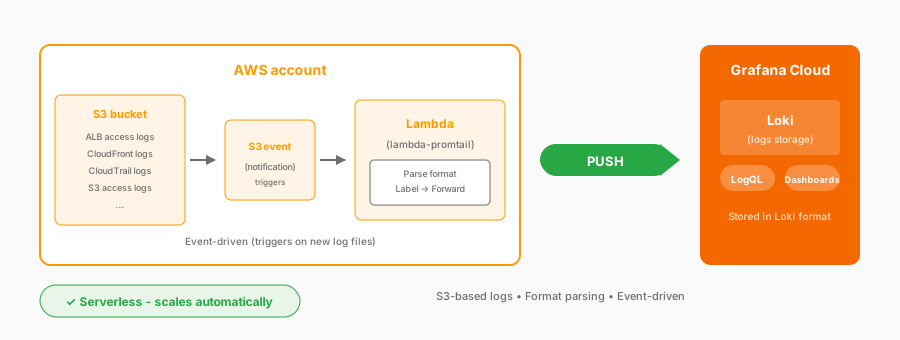
AWS logs Lambda architecture: Specific log types trigger Lambda to forward to Grafana Cloud Logs

Complexity: Simple | Infrastructure: Serverless | Latency: Event-driven

You deploy a Lambda function that triggers on events. When the logs are available, Lambda parses each format, adds labels, and forwards them to Grafana Cloud Logs.

Specific log types collected with Lambda

Log typeFormatKey insights
ALB Access LogsSpace-delimitedRequest latency, targets, status codes
CloudFront LogsTab-separatedEdge locations, cache hits
S3 Access LogsSpace-delimitedBucket access patterns
CloudTrailJSONAPI activity, audit

Considerations

  • Event-driven and automatic
  • Serverless, with no infrastructure to manage
  • Custom transformation of log data
  • Parsing configuration required for each log format
  • Cost that scales with log volume

Documentation

View the AWS Lambda logs documentation.

Script

The Lambda agent, also known as lambda-promtail, handles specific log types that Firehose doesn’t support yet.

Several AWS services write logs that need Lambda collection. ALB access logs give you HTTP request details: latency, status codes, which backend handled the request.

CloudFront logs show CDN performance: edge locations, cache hit rates.

CloudTrail logs every AWS API call: who did what, when, and from where.

Here’s how it works: you deploy a Lambda function that triggers on events. When these logs are available, Lambda processes them, parsing the format and adding labels, and then forwards them to Grafana Cloud Logs.

The beauty is serverless simplicity. No EC2 instances to patch, no containers to manage.

Lambda scales automatically with your log volume. You can customize the processing logic to fit your needs.

A few things to know: Lambda has execution costs, and you’ll need to configure parsing for each log format, since ALB logs are space-delimited, CloudFront is tab-separated, and CloudTrail is JSON.