A pipeline in action
Here is a small pipeline that collects logs from files and writes them to Loki, a Grafana backend for log storage. This example focuses on the shape of the pipeline, not the syntax details, which come later in this journey.
This configuration comes from the runnable logs-file example in the alloy-scenarios repository.
local.file_match "local_files" {
  path_targets = [{"__path__" = "/temp/logs/*.log", "job" = "python"}]
  sync_period  = "5s"
}

loki.source.file "log_scrape" {
  targets       = local.file_match.local_files.targets
  forward_to    = [loki.write.local.receiver]
  tail_from_end = true
}

loki.write "local" {
  endpoint {
    url = "http://loki:3100/loki/api/v1/push"
  }
}
Read it as discover, collect, send
This short path uses discovery to start collecting, then sends the data on. It skips the transform job. Processing components often sit between collect and send in fuller pipelines.
Follow the data from top to bottom, from discovering log files through to sending entries to Loki.
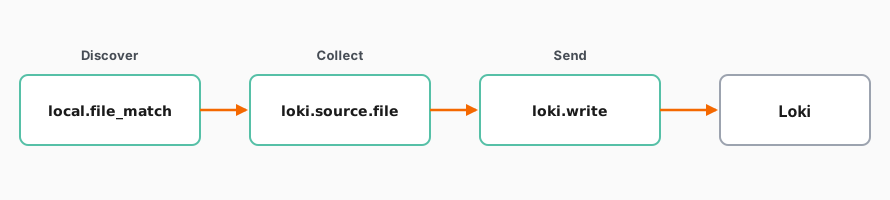
- Discover:
local.file_matchfinds matching log files. - Collect:
loki.source.filetails those files and forwards the log entries. - Send:
loki.writesends the entries to Loki.
Each component hands its work to the next, so the three components together form one pipeline.
Real pipelines do more
This example keeps the path short. Real production pipelines often add processing components between the collect and send steps to add or change identifying fields, parse log lines, filter unwanted data, or redact secrets.