Slide 1 of 4

CI/CD pipeline architecture

CI/CD pipeline flow

This diagram shows the end-to-end pipeline from code commit to deployed dashboard.
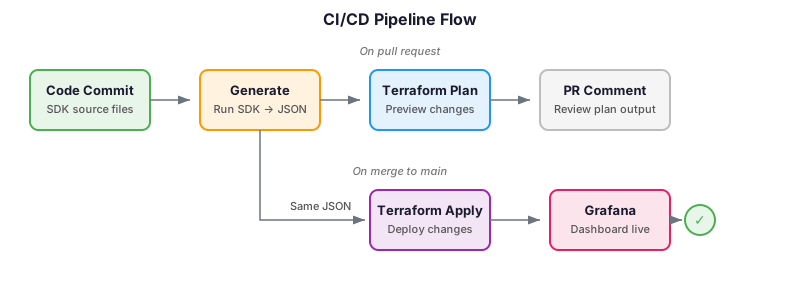
Diagram showing CI/CD pipeline: on pull request, code flows through generate, plan, and PR comment stages; on merge to main, it continues through Terraform apply to a live dashboard in Grafana

What each stage does

The pipeline has three stages, each triggered at a different point in the workflow.

StageTriggerAction
GenerateEvery pushRun SDK code, produce dashboard JSON
PlanEvery pushShow what Terraform will change
ApplyMerge to main onlyDeploy changes to Grafana

When each path runs

The same stages run along two paths, depending on where the code is in the workflow:

  • On a pull request: the pipeline runs generate and plan, then posts the plan as a PR comment for review. Nothing is deployed yet.
  • On merge to main: the pipeline runs all three stages. Generate produces the latest JSON and Terraform applies it, so the dashboard in Grafana always reflects the latest code on main.

The review gate

The Terraform plan output is posted as a PR comment so you can see:

  • Which dashboards will be created, updated, or destroyed
  • Exactly what configuration will change

This gives you the full benefits of dashboards as code: every change is reviewed, every deployment is automated, and you can trace any dashboard back to the commit that produced it.

Script

The pipeline has three stages. First, generate: your Foundation SDK code runs and produces dashboard JSON files. Second, plan: Terraform reads those files and shows what will change. Third, apply: on merge to main, Terraform deploys the changes to Grafana.

On pull requests, the pipeline runs the generate and plan stages. It posts the Terraform plan as a PR comment so reviewers can see exactly what will change in Grafana before approving. This is your review gate, the same pattern you use for infrastructure changes.

On merge to main, the pipeline runs all three stages. Generate produces the latest JSON, and Terraform applies it to your Grafana instance. The dashboard in Grafana always reflects the latest code on main.

This architecture gives you the full benefits of dashboards as code: every change is reviewed, every deployment is automated, and you can trace any dashboard back to the commit that produced it.