Pending period and keep firing for
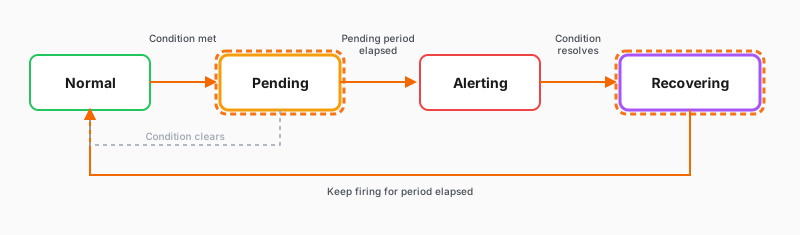
The pending period prevents false positives
Temporary data spikes can briefly cross the threshold without indicating a real problem. That means you don’t need an alert to fire. The pending period requires the condition to persist across multiple checks before firing.
For example, a 5m pending period with a 1m evaluation interval means the condition must stay above your threshold for five consecutive checks before the alert fires.
Data often arrives a little late, so the newest data point can be incomplete when Grafana runs a check. Because the pending period waits for several checks in a row, one reading based on partial data won’t fire the alert on its own.
Reduce alert fatigue through evaluation behavior
When a condition hovers near the threshold, the alert can fire and resolve repeatedly. Keep firing for holds the firing state briefly after the condition resolves, so you only receive a resolved notification when the problem is genuinely gone.