Slide 1 of 3

How evaluation works

How evaluation works

The following diagram shows how an alert moves through states.
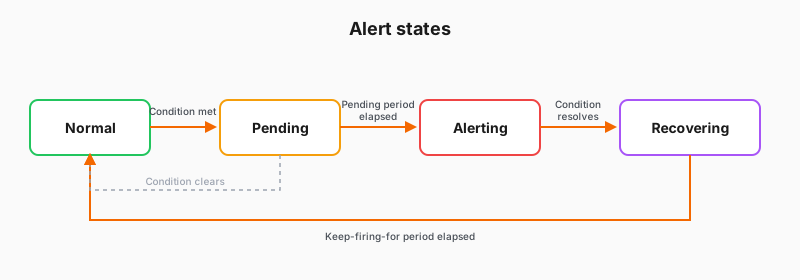
Diagram of alert states from Normal through Pending, Alerting, and Recovering
StateCondition is:
NormalNot met
PendingMet, pending period has not elapsed
AlertingMet past the pending period. Notification sent.
RecoveringNo longer met, keep firing for period active

For more details on alert states and how they function, refer to View the state and health of alert rules.

How checking works

During evaluation, Grafana checks your alert rule at regular intervals. Three settings control when the rule fires:

  • Evaluation group: Sets how often Grafana checks the alert rules in it. You create one (or reuse an existing one), and give it a name and an interval. That way related rules can share the same schedule, for example a group of related rules checked once a minute.
  • Pending period: How long the condition must persist before the alert fires.
  • Keep firing for: How long the alert stays firing after the condition resolves.

Script

Grafana checks your alert rule on a schedule. This checking process is called evaluation, and an evaluation group sets how often it runs.

Shorter intervals detect problems faster but put more query load on your data sources.

As a rule is checked, it moves through lifecycle states: Normal when the condition isn’t met, Pending once it’s first met, Alerting after the pending period elapses, and Recovering while keep firing for is still active.