
 Grafana Cloud
Observe and act
Test and validate
Synthetic Monitoring
Create checks
Check types
k6 scripted check
Grafana Cloud
Observe and act
Test and validate
Synthetic Monitoring
Create checks
Check types
k6 scripted checkk6 scripted check
k6 scripted checks can execute k6 tests in Synthetic Monitoring. Use k6 scripted checks to monitor transactions and user flows by implementing workflows, custom logic, and validations in JavaScript.
With k6 scripted checks, you can:
- Define custom user behavior and complex request logic.
- Leverage the flexibility of a scripting language.
- Test HTTP/S and WebSocket services.
- Utilize the k6 API and other JavaScript libraries.
- Enable OpenTelemetry traces for server-side correlation.
- Reuse the same k6 script for distinct testing goals.
In the Synthetics app, you create a k6 scripted check with the Scripted option. Its check type identifier is scripted, which the REST API, Terraform, check metrics, and the Checks list use. To compare it with the other check types, refer to Choose a check type.

How it works
A k6 check runs one iteration of a k6 test at short, frequent intervals to proactively monitor applications and services.
An iteration is one run of the script’s default function or the function selected by a scenario’s exec option. It can include multiple requests or browser interactions. Each scheduled execution from a probe runs one iteration.
Synthetic Monitoring results are stored as Prometheus metrics and Loki logs, which allow you to set up Grafana alerts for custom notifications and incident management.
The k6 scripts in Synthetic Monitoring are broadly compatible with other k6 products, like the k6 CLI and Grafana Cloud Performance Testing. This allows you to reuse the same k6 script for various use cases, enhancing testing productivity and coverage.
Get started
You can write and execute a k6 script from the code editor in the Synthetics UI.
- On the left-side menu, select Testing & synthetics and then Synthetics.
- Click Create new check or Create your first check.
- Choose Scripted as your check type.
- Set the value for the required options.
- Edit or copy your k6 script under Script.
- Schedule or run the check.
- Click Save to schedule the check.
- Click Test to run the k6 script.
For development and debugging, you can write and execute the k6 script from your local machine using the k6 CLI and your IDE. After completing the k6 script, create a new scripted check or update the script of an existing one.
For response validation and error handling patterns, refer to Write resilient check scripts.
The Synthetics script editor includes a few scripts with basic examples. To get started implementing your first k6 scripts, refer to:
Select a k6 version channel
On the Script step of the check form, select a channel from the k6 version channel list. For details, refer to Manage k6 versions.
Options
The list of common options to all check types:
The frequency and timeout ranges in this table apply to k6 scripted and k6 browser checks.
Additionally, k6 scripted checks have the following options:
Supported k6 Options
k6 options can be used to configure a wide range of features when running the k6 script. In Synthetic Monitoring, k6 options can only be set in the script options object:
export const options = {
  tags: { foo: 'bar' },
  userAgent: 'MyK6UserAgentString/1.0',
};
Several k6 options don’t apply in the context of Synthetic Monitoring. Here is the list of supported options:
Metrics
Synthetic checks store their results as Prometheus metrics, including the list of common metrics to all check types:
Note
For k6-based checks,
probe_duration_secondshas the same value asprobe_script_duration_seconds: the time k6 spends running the script. It does not include the time k6 needs before the script starts, which covers starting k6, downloading remote modules the script imports, for example fromjslib.k6.io, and compiling the script. Modules are downloaded one after another, so a slow module host can make this startup take longer than the script itself.If the startup fails, for example because a module download fails or times out, or because the script has a syntax error, the script never runs and
probe_script_duration_secondsis not reported. In that case,probe_duration_secondsreports the full time the check took, up to the check timeout.
k6 metrics
Scripted checks also collect the metrics produced by k6 and store them as Prometheus metrics.
k6 has two types of metrics:
- Built-in metrics: These are metrics collected by every k6 test, such as data received and total number of requests.
- Custom metrics: These are metrics that you can create in your test script to measure anything that’s specific to your system or business logic. In Prometheus, they’re renamed to
probe_K6_METRIC_NAMEand mapped to Prometheus gauges.
k6 built-in metrics are transformed in Synthetic Monitoring as follows:
Visualization
You can query all the produced check metrics with Grafana Explore, where you can create custom panels and add them to your dashboards.
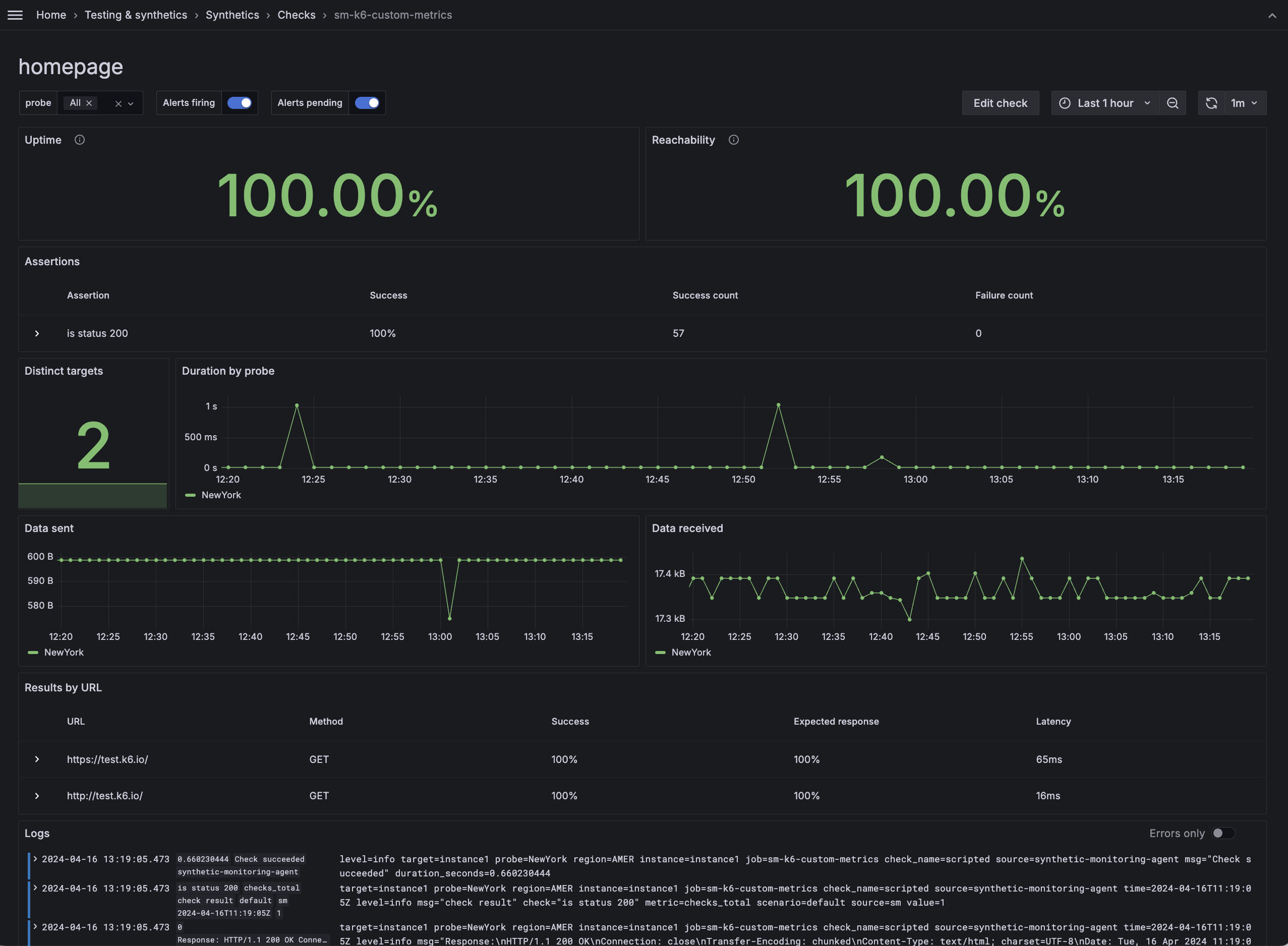
Additionally, each check includes a dashboard displaying the results of the most relevant metrics. To learn more about the various visualization options, refer to Analyze results.
Compatibility
Grafana Cloud Synthetic Monitoring has the following limitations for k6 scripts, compared to running them locally or using Grafana Cloud k6:
Workload options
Each k6 check execution runs one iteration: one run of the script’s default function or the function selected by a scenario’s exec option. The system ignores options such as vus, duration, stages, and iterations.
Timeout
k6 checks have a maximum execution time. Configure this limit with the Timeout option in the UI.
k6 CLI
You can’t use the k6 CLI to run or upload k6 scripts to Grafana Cloud Synthetic Monitoring.
Other k6 APIs
Thresholds aren’t supported.
Labels and k6 tags
Custom labels that you define in the UI are separate from the tags you define in your k6 script with the k6 tags option.
Where a k6 tag appears depends on where you set it:
- Test-wide tags, set in the
options.tagsfield, appear on the metrics that k6 generates:probe_checks_total,probe_check_success_rate,probe_data_sent_bytes,probe_data_received_bytes, andprobe_iteration_duration_seconds. They don’t appear on the metrics that the Synthetic Monitoring agent generates, such asprobe_all_duration_seconds_*,probe_all_success_*,probe_duration_seconds,probe_script_duration_seconds,probe_success, andsm_check_info. - Request-specific tags, set on an individual request, appear only on the corresponding HTTP request metrics:
probe_http_duration_seconds,probe_http_status_code,probe_http_info, andprobe_http_requests_total.
In check logs, k6 tags aren’t indexed as labels. They appear as logfmt key-value pairs in the log line itself, so you can filter on them with the LogQL label-filter syntax.
Caution
Unlike custom labels, k6 tags aren’t validated against the reserved system label names, because Synthetic Monitoring doesn’t inspect the contents of your script.
If a k6 tag name collides with a reserved system label name, Synthetic Monitoring overwrites your tag value with its own value on metrics. Check logs are unaffected, because k6 tags aren’t indexed as labels there.
Load local files
For security reasons, probes can’t load local files. k6 APIs such as open, fs, and grpc.load (non-reflection) aren’t supported.
To import local modules or libraries, use a bundler to build your k6 script with its dependencies locally, then copy the output into the script option.
Was this page helpful?
Related resources from Grafana Labs



