
 Grafana Cloud
Observe and act
Alert and measure reliability
Service Center
Create a service
Grafana Cloud
Observe and act
Alert and measure reliability
Service Center
Create a serviceCreate a service
Create a service to enable the Service Center view and provide a centralized operational view of your team’s services.
A service represents an application, API, or other component that your team owns and operates. Service Center correlates Grafana Cloud resources to a service by matching labels and tags that identify that service.
You can create and manage services directly in Grafana Cloud, discover them from your existing resources, provision them with Terraform, or import them from Backstage.
Add a service
To create a service in Grafana Cloud, navigate to Alerts & IRM > Service Center > Services and click New service.
Set name and attributes
Configure the basic information for the service:
Enter a name for the service.
Optional: Enter a description of the service.
Optional: Assign a team to the service to enable on-call information and respond to service issues from Service Center.
Optional: Enter custom attributes using Add Attribute.
Attributes provide additional context about the service. Common examples include links to Documentation, Repository, and other relevant metadata.
Configure service content
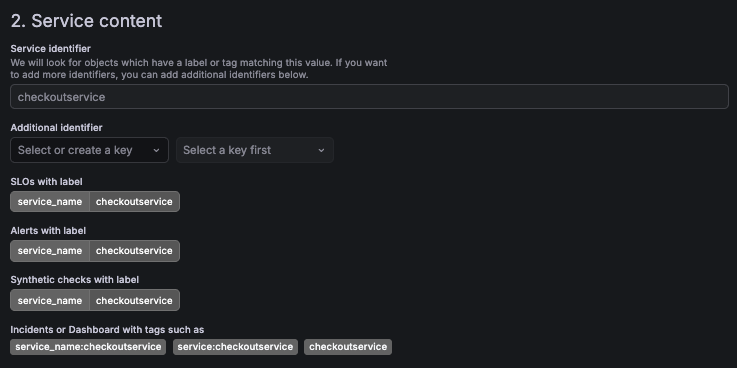
In the Service content section, define how Service Center identifies resources associated with the service.
- Service identifier defines the value of the
service_namelabel used to discover related resources such as incidents, SLOs, dashboards, synthetic checks, and alert rules. - Additional identifiers let you define up to five more label key-value pairs, for resources that use another label convention.
The service identifier must be 2 to 63 characters long, and can contain only lowercase letters, numbers, and dashes. It must start and end with a letter or number. When you create a service, Service Center fills in the identifier from the service name until you enter your own value.
Note
The Service identifier value can’t be changed after the service is created.
Add additional identifiers
Use additional identifiers when some of your resources don’t use the service_name label. For example, your alert rules might use app=checkout and your SLOs might use namespace=checkout-prod. Service Center shows a resource on the service when it matches the service identifier or any of the additional identifiers.
To add additional identifiers, follow these steps:
In Additional identifiers, select a key, or enter a new one.
Select a value for the key, or enter a new one.
To add another identifier, click Add identifier.
You can add up to five additional identifiers.
To remove an identifier, click the trash icon next to it. When you save the service, Service Center ignores any row that doesn’t have both a key and a value.
The preview under the identifiers shows the labels and tags that Service Center matches:
The Incidents and IRM sections of the Service Center view also use the additional identifiers.
Note
Links that open another app with a filtered view, such as See all alerts in the Alerting section, filter by the service identifier only. Resources that match only an additional identifier appear in Service Center, but not in the linked view.
To find services by additional identifier, use Filter by identifier in the service list. For more information, refer to Find and organize services.
Configure dependencies
Optionally, define dependencies between services to model relationships within your system architecture. Dependencies help assess potential upstream or downstream impact during incidents.
After you save the service, Service Center discovers matching resources and displays them in the Service Center view.
Discover services from existing resources
If your SLOs, alert rules, dashboards, incidents, or synthetic checks already use a label such as service_name to identify services, you can create many services at once. Discover services lists the values of that label as candidate services, lets you choose how they’re named, and creates the ones you select.
For instructions, refer to Discover services.
Provision services with Terraform
You can also manage services as code with the Grafana Terraform provider, which lets you version service definitions and keep them alongside the teams, SLOs, and alert rules they relate to.
For instructions, refer to Provision services using Terraform.
Import services from Backstage
If you use Backstage, you can import services from your software catalog and keep them synchronized with Service Center.
Imported services are automatically correlated with Grafana Cloud resources such as incidents, SLOs, and other operational data.
To configure the integration, follow the instructions for the backstage-plugin-grafana-catalog.
Was this page helpful?
Related resources from Grafana Labs



