
 Grafana Cloud
Observe and act
Agent Observability
Observe and troubleshoot
Coding agents
Grafana Cloud
Observe and act
Agent Observability
Observe and troubleshoot
Coding agentsMonitor coding agents
Every person on your team runs several coding agents, and each one keeps its own usage in its own silo. Nobody sees what the agents cost, how many tokens they burn, or which tools they call. Agent Observability puts all of it in one view, with no application code changes.
Before you begin
- Install the
agento11yCLI on your machine. On macOS, use Homebrew (brew install grafana/grafana/agento11y). On Linux and macOS, you can also use the install script. For instructions, refer to Set up and monitor coding agents. - To share sessions with Grafana Cloud, ensure Agent Observability is enabled on your Grafana Cloud stack and your role has data-read permission.
See all your agents in one view
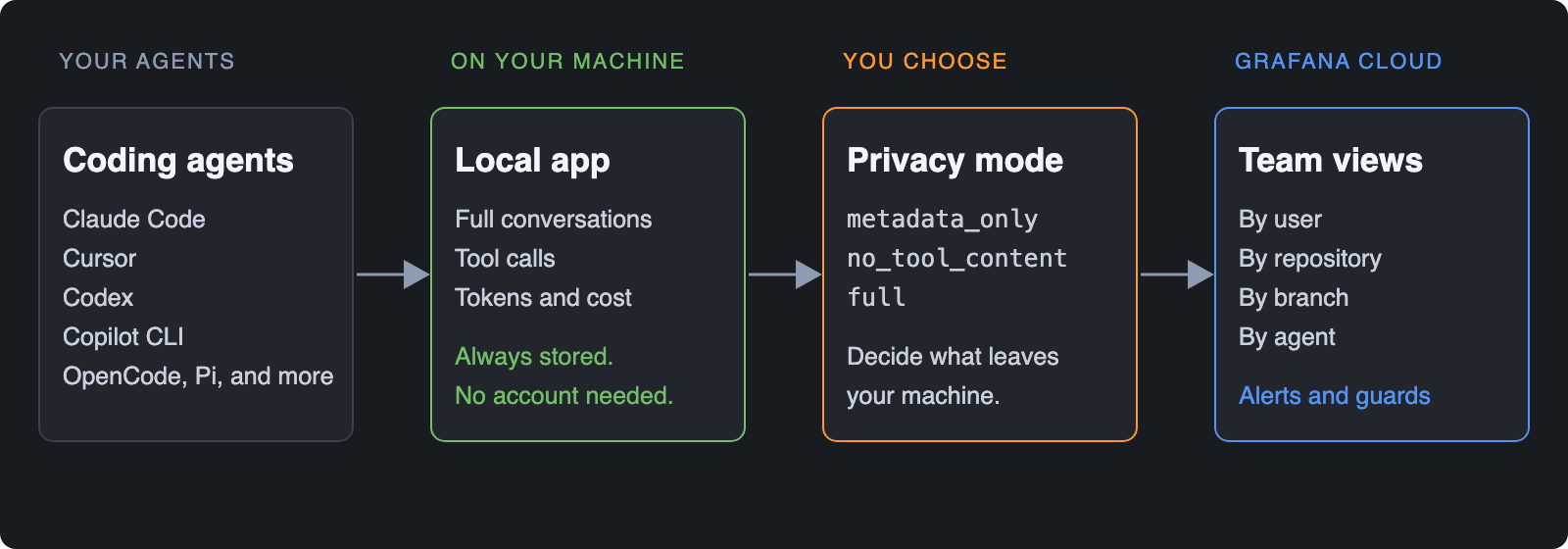
Install the integration once and every supported agent reports into the same place: Claude Code, Cursor, Codex, Copilot CLI, OpenCode, Pi, and more. Refer to Supported coding agents for the full list.
Start locally, share when you’re ready
You see everything on your own machine first, and you choose what leaves it.
Review sessions in the local app
The local app runs on your machine at http://localhost:8765. It doesn’t need an account or network access. It keeps full conversations, tool calls, tokens, and estimated spend as plain files on your disk, so you can see what your agents do before you share anything. Open http://localhost:8765 in your browser, or run agento11y local open. Manage the app with agento11y local start, status, stop, or restart.
The app has four pages: Sessions, Analytics, Security, and Settings.
Inspect sessions and spend
Use Sessions to find any conversation. Search prompts, responses, and tools, and filter by workspace, agent, model, or status. Each row shows the first prompt, workspace, agent, cost, tokens, duration, call count, and models, so you can spot an expensive or long-running session at a glance. Open a session to read the full thread.
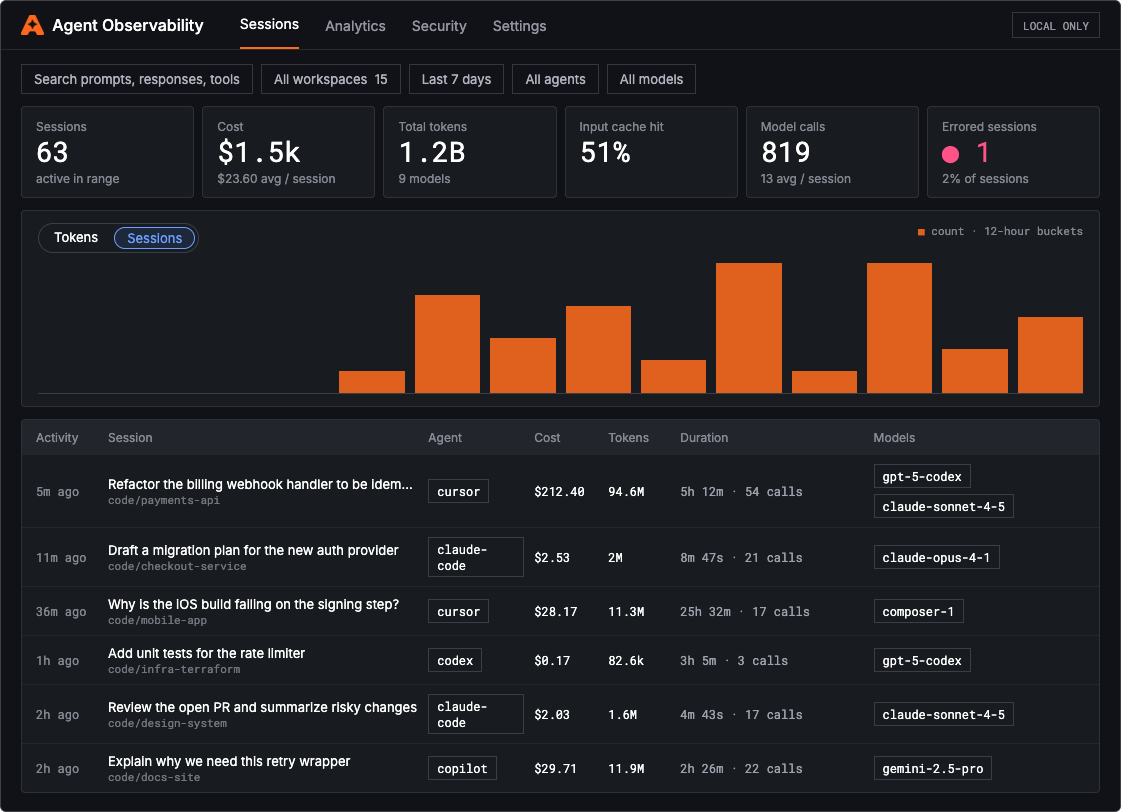
Summary cards above the list show sessions, cost, total tokens, input cache hit rate, model calls, and errored sessions for the selected range. The app starts with sessions captured after you install agento11y. To add earlier sessions, use the banner on Sessions or go to Settings > History.
Use Analytics to measure usage in cost or tokens over the last 30 days. Review estimated spend, total tokens, input cache hit rate, and model calls with the change from the previous period. Break usage down by workspace and model, and compare blended cost per million tokens across models.
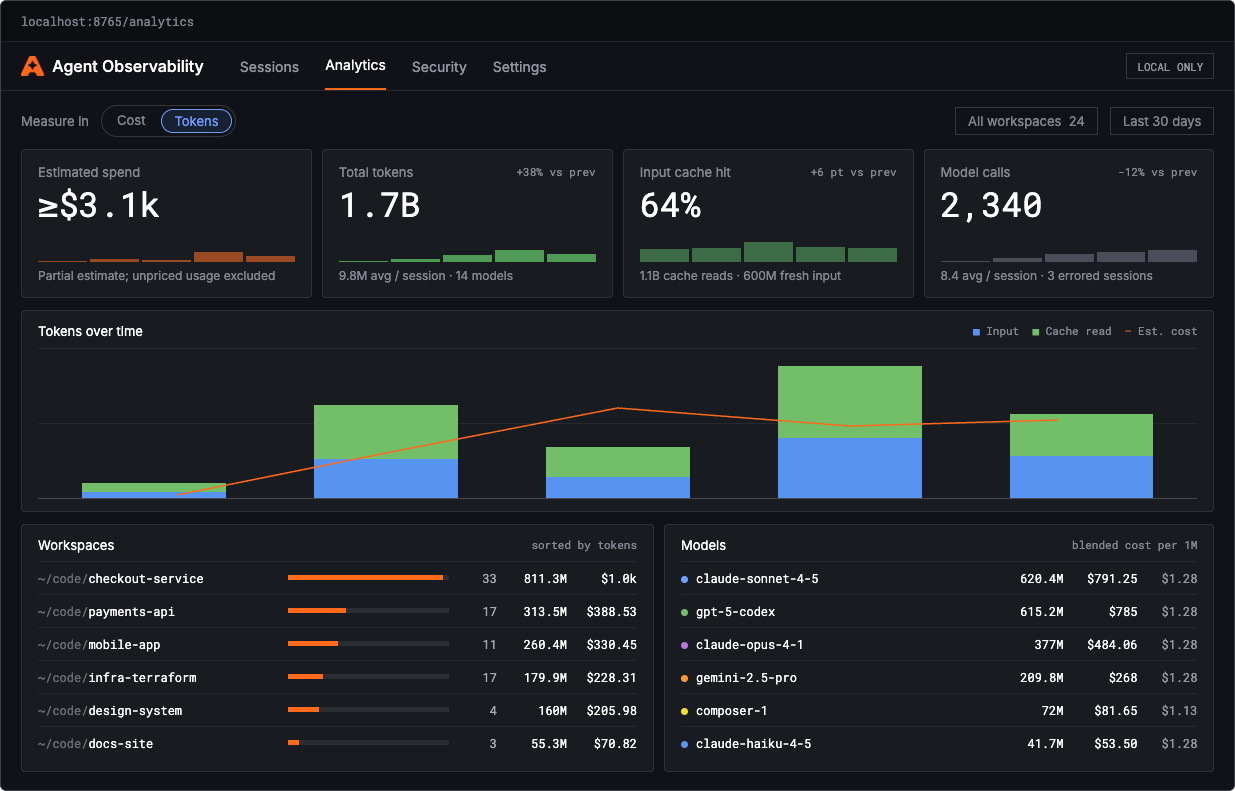
Estimated spend is a partial estimate. The app excludes usage from models that it can’t price.
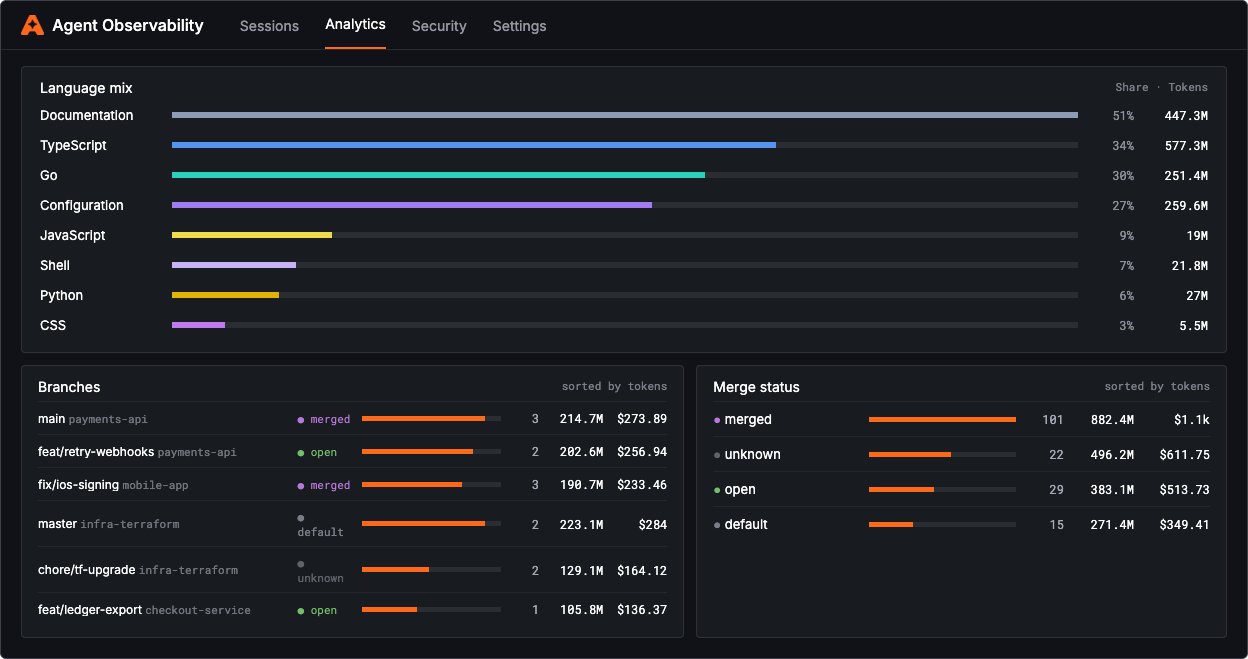
Scroll down on Analytics to see which sessions led to merged work. Break usage down by branch and merge status, and see which languages your tokens went to.
Stop risky actions with local guards
Use Security to turn on guard packs that block tool calls or redact their arguments before they run. Guards run on your device and work offline. Rules are saved in ~/.config/agento11y/guards.toml.
The following table lists each guard pack, when to choose it, what it covers, and what it doesn’t cover:
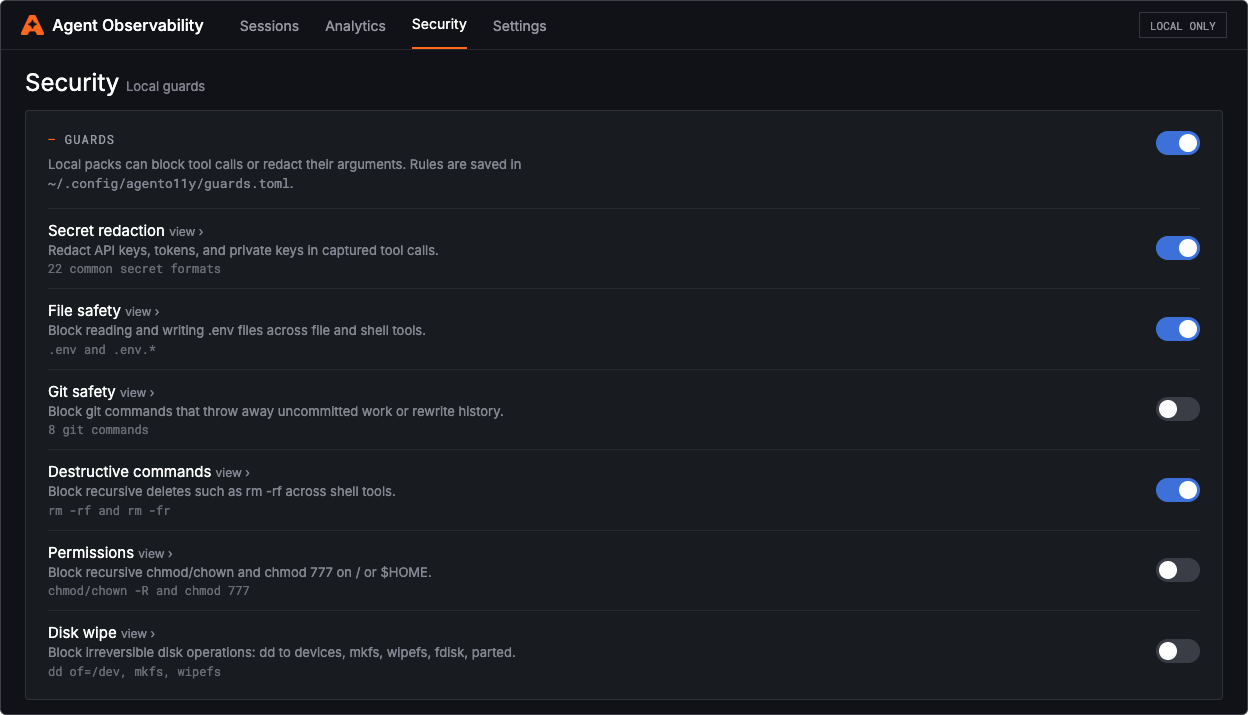
Local guards are defense in depth, not a sandbox. Test your rules offline with agento11y guards test.
Choose what you share
When you connect to Grafana Cloud, the content capture mode controls what leaves your machine:
Get a team view in Grafana Cloud
In Grafana Cloud, navigate to Agent Observability and select Coding agents to view sessions, estimated cost, tokens, active repositories, and active users across your team.
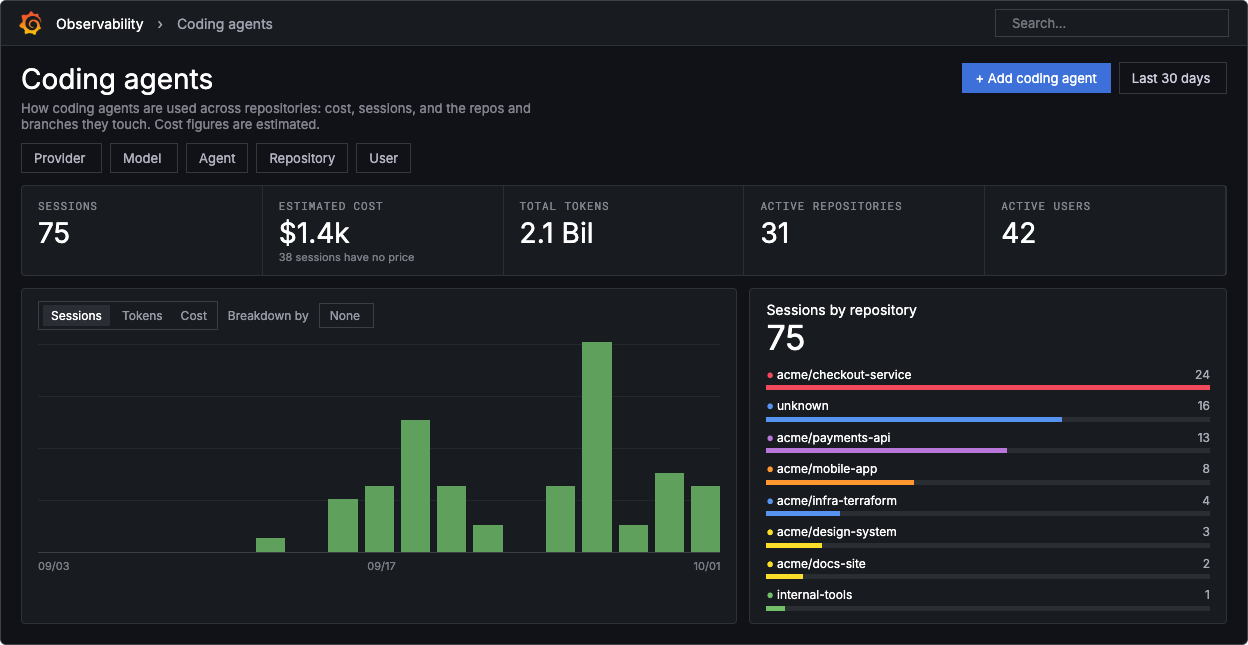
Use the breakdown picker on the usage chart to group sessions, tokens, or cost by dimension.
To see who and what drives spend, enable automatic tags for user, repo, and branch. Then sort repositories and branches by estimated cost.
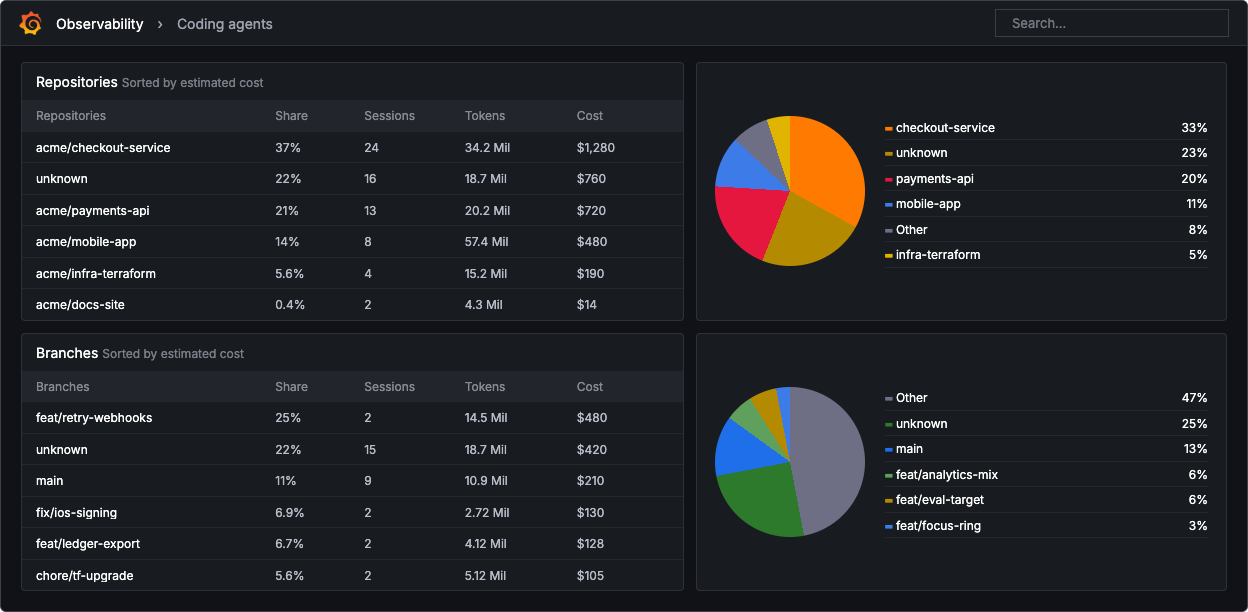
Because agent data lands as standard metrics, you can also build alerts and reports in Grafana for spend or token spikes. For attribution details, refer to Attribute cost to a user, repository, or branch.
Get started in three commands
Run the following commands to install agento11y, authenticate with Grafana Cloud, and launch an agent:
brew install grafana/grafana/agento11y
agento11y login
agento11y claude
Replace claude with codex, pi, or another supported agent. For other platforms, credentials, and unattended rollouts, refer to Set up and monitor coding agents.
Next steps
Was this page helpful?
Related resources from Grafana Labs


