
Menu

Grafana Cloud
SLO performance
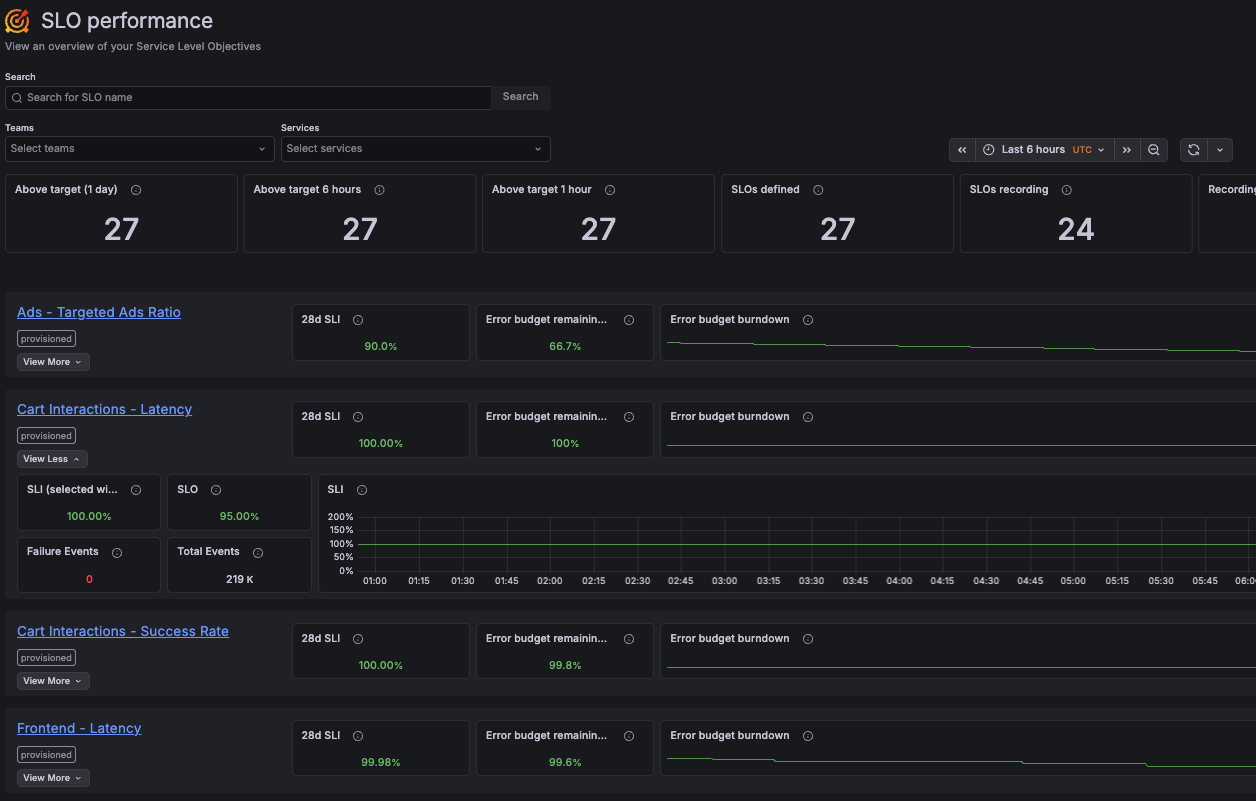
The SLO performance page provides an overview of all your service level objectives (SLOs). It helps you understand the current reliability status by showing SLO results across teams and services in a single view.
With SLO performance, you can:
- View all SLOs and their current performance in one place, and filter them by team or service.
- Review how many SLOs are meeting their objectives over recent time windows (last day, 6 hours, and 1 hour).
- Monitor key SLO metrics, such as the current SLI value, remaining error budget, and error budget burndown.
- Explore additional SLO details over a selected period, including SLI trends and event volume.
- Navigate to the SLO dashboard for detailed results.
For details about how SLO metrics are calculated, refer to the SLO dashboard documentation.
Was this page helpful?
Related resources from Grafana Labs

Video

Getting started with managing your metrics, logs, and traces using Grafana
In this webinar, we’ll demo how to get started using the LGTM Stack: Loki for logs, Grafana for visualization, Tempo for traces, and Mimir for metrics.
Video

Start with Grafana Assistant
Learn how Grafana Assistant helps teams get answers faster using AI—without writing PromQL. Join this webinar to discover prompting best practices and security FAQs.
Video

Building advanced Grafana dashboards
In this webinar, we’ll demo how to build and format Grafana dashboards.