
Menu

Grafana Cloud

Service Center
Service Center in Grafana Cloud provides a centralized operational view for your services, bringing together service health, SLOs, alerts, incidents, on-call information, and dashboards in a single view.
As systems grow, operational context often becomes fragmented across dashboards, alerting tools, and IRM workflows.
In this environment, the service ownership model helps organizations establish accountability and manage operations at scale. Service Center in Grafana Cloud supports this model by providing a centralized operational view of your services.
Service Center helps teams quickly assess service reliability and ongoing operational issues from a single place, helping answer questions such as:
- How is our service performing this week?
- Who owns it, and who’s on call?
- What’s broken, and what’s improving?
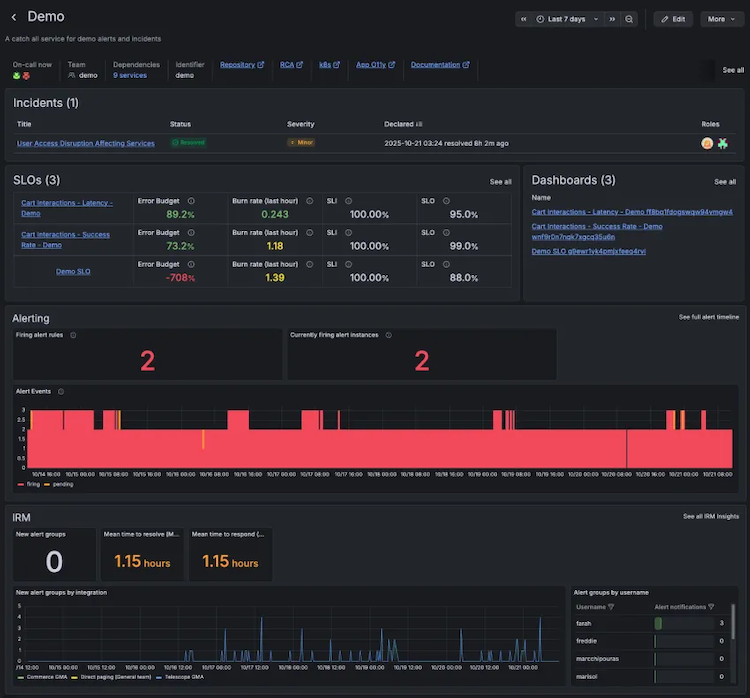
Each service view provides operational context for your services, including:
- SLOs with summary data to understand how reliability is trending
- Alerts with quick insight into current or recurring issues
- Incidents for context on recent or ongoing disruptions
- On-call and paging information to identify responders and understand activity
- Synthetic checks to verify service uptime and availability
Explore
Introduction to the Service Center view
Learn how the Service Center view connects service health, SLOs, incidents, alerts, dashboards, and ownership.
Create a service
Configure a service and connect teams and operational resources to enable the Service Center view.
Discover services
Find services in the labels on your existing SLOs, alerts, dashboards, incidents, and synthetic checks, and create them in bulk.
Provision services using Terraform
Manage services as code with the Grafana Terraform provider, including ownership, dependencies, and links.
Find and organize services
Search and filter the service list, star services, and share filtered views with your team.
Was this page helpful?
Related resources from Grafana Labs

Video

Getting started with managing your metrics, logs, and traces using Grafana
In this webinar, we’ll demo how to get started using the LGTM Stack: Loki for logs, Grafana for visualization, Tempo for traces, and Mimir for metrics.
Video

Start with Grafana Assistant
Learn how Grafana Assistant helps teams get answers faster using AI—without writing PromQL. Join this webinar to discover prompting best practices and security FAQs.
Video

Building advanced Grafana dashboards
In this webinar, we’ll demo how to build and format Grafana dashboards.