Grafana Cloud
Observe and act
Alert and measure reliability
Alerting
Introduction
Alert rule evaluation
Grafana Cloud
Observe and act
Alert and measure reliability
Alerting
Introduction
Alert rule evaluationAlert rule evaluation
The criteria determining when an alert rule fires are based on three settings:
Evaluation group: how frequently the alert rule is evaluated.
Pending period: how long the condition must be met to start firing.
Keep firing for: how long the alert continues to fire after the condition is no longer met.

Set alert rule evaluation
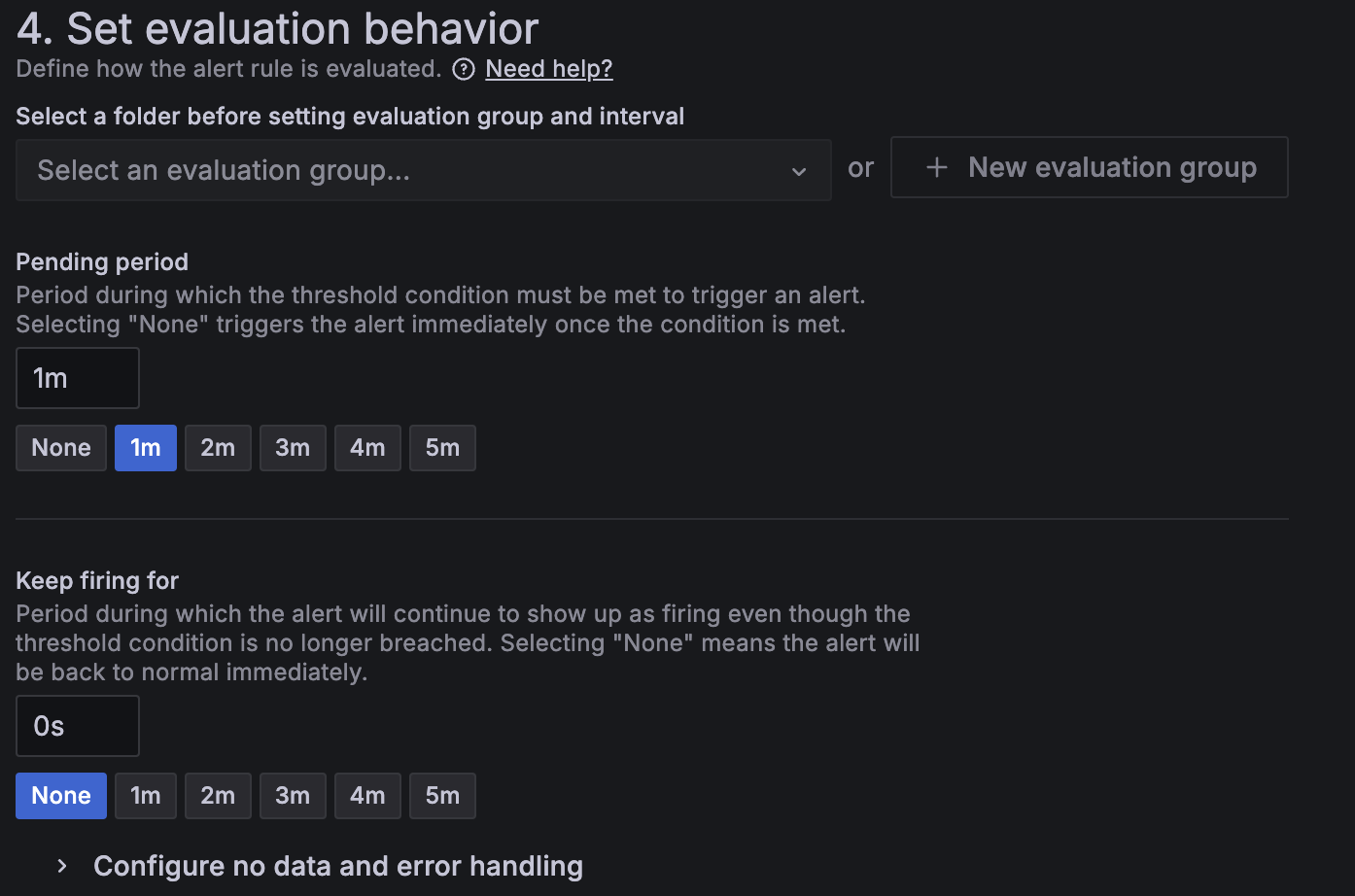
These settings affect how alert instances progress through their lifecycle.
Alerting lifecycle
Each alert rule can generate one or more alert instances.
An alert instance can be in any of the following states, depending on the outcome of the alert rule evaluation:
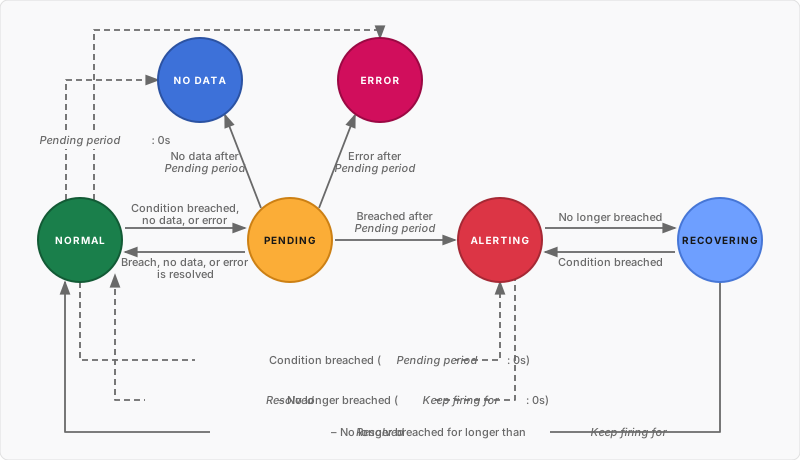
If an alert rule changes (except for updates to annotations, the evaluation interval, or other internal fields), its alert instances reset to the Normal state, and update accordingly during the next evaluation.
Note
The No Data and Error states are supported only for Grafana-managed alert rules. Refer to No Data and Error states to customize their default behavior for triggering a dedicated alert.
Notification routing
Alert instances are routed for notifications in two scenarios:
- When they transition to the Alerting state.
- When they transition to Normal state and marked as
Resolved, either from the Alerting or Recovering state.
Evaluation group
Every alert rule and recording rule is assigned to an evaluation group. Each evaluation group contains an evaluation interval that determines how frequently the rule is checked. For instance, the evaluation may occur every 10s, 30s, 1m, 10m, etc.
Rules can be evaluated concurrently or sequentially. For details, see How rules are evaluated within a group.
Pending period
You can set a Pending period to prevent unnecessary notifications caused by temporary issues.
When an alerting condition is met, the alert instance enters the Pending state. It remains in this state while any alerting condition is met during the configured pending period. After the pending period has elapsed, the alert transitions to the state corresponding to the last evaluation.
This ensures the condition breach is stable before the alert transitions to the Alerting state and routed for notification.
- Normal -> Pending -> Alerting*
You can also set the Pending period to zero to skip the Pending state entirely and transition immediately to the Alerting, No Data, or Error state.
Keep firing for
You can set a Keep firing for period to avoid repeated firing-resolving-firing notifications caused by flapping conditions.
When the alert condition is no longer met during the Alerting state, the alert instance enters the Recovering state.
- Alerting → Recovering → Normal (Resolved)*
- After the Keep firing for period elapses, the alert transitions to the Normal state and is marked as Resolved.
- If the alert condition is met again, the alert transitions back to the Alerting state, and no new notifications are sent.
You can also set the Keep firing for period to zero to skip the Recovering state entirely.
Evaluation example
Keep in mind:
- One alert rule can generate multiple alert instances—one for each series or dimension produced by the rule’s query. Alert instances from the same alert rule may be in different states.
- Only alert instances in the Alerting and Normal (Resolved) state are routed for notifications.
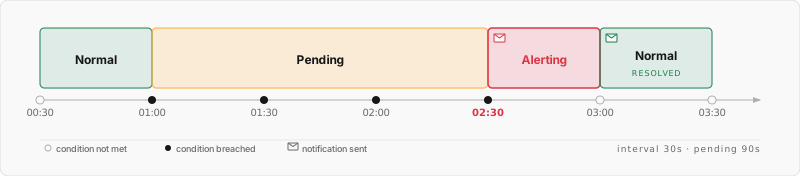
Consider an alert rule with an evaluation interval set at every 30 seconds and a pending period of 90 seconds. The evaluation occurs as follows:
With a keep firing for period of 0 seconds, the alert instance transitions immediately from Alerting to Normal, and marked as Resolved: