
Menu

Enterprise
Grafana Mimir Scaling dashboard
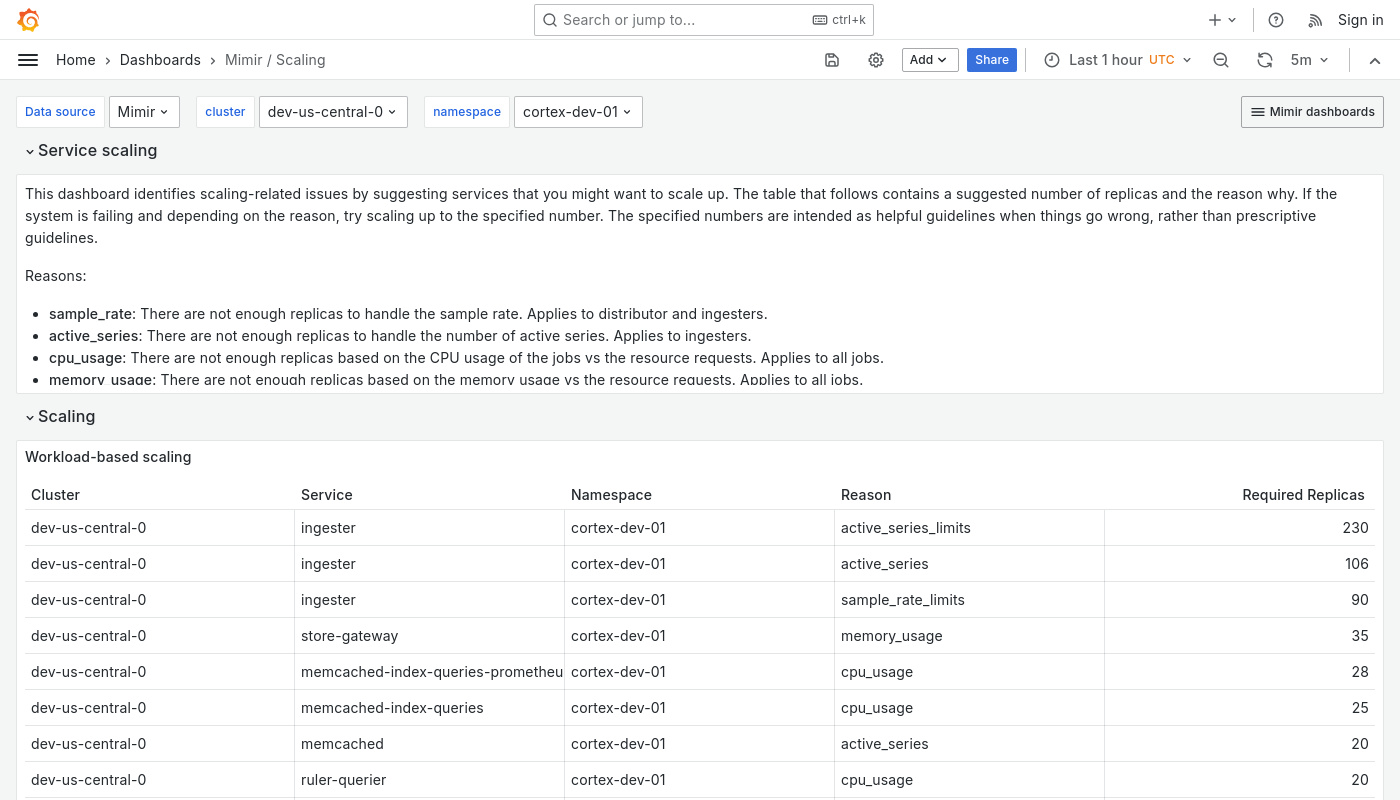
The Scaling dashboard displays services that you can optionally scale up in the event of a failure caused by one or more reasons.
Use this dashboard for the following use cases:
- Identify which Mimir components require scaling in response to specific failures or performance issues.
- Review metrics for individual Mimir services, such as CPU usage versus request rates, to pinpoint which components are experiencing high load.
- Integrate with Mimir runbooks for detailed guidance on scaling strategies for various components.
Example
The following example shows a Scaling dashboard from a demo cluster.
Was this page helpful?
Related resources from Grafana Labs

Video

How Robinhood scaled from 100M to 700M time series with Grafana Enterprise Metrics
In this GrafanaCONline session, the Robinhood team tells how GME (GameStop) led to GEM (Grafana Enterprise Metrics).

Blog
Benchmarking Grafana Enterprise Metrics for horizontally scaling Prometheus up to 500 million active series
We stress-tested GEM to show how it horizontally scaled. One takeaway: Hardware usage scales linearly up to 500 million active series.